Last updated: November 4, 2026
Generative Engine Optimization (GEO) is the practice of making your content easy for AI tools to find, understand and cite in their answers. These tools include Google AI Overviews, Google AI Mode, ChatGPT, Gemini and Perplexity.
In this guide, you will learn what GEO means, how it differs from SEO, what Google itself says about it, what research shows, and practical steps you can follow. Where the evidence is weak or mixed, the guide says so.
What Is Generative Engine Optimization (GEO)?
When you ask an AI tool a question, it often writes a direct answer instead of showing only a list of links. Many of these answers mention or link to the web pages they used. GEO is about making your page one of those sources.
You will also see the term AEO (Answer Engine Optimization). In practice, most people use GEO and AEO to mean the same thing.
An honest note: GEO is an industry term, not an official Google term. Google’s own guide says that, from its perspective, optimizing for generative AI search is still SEO.
Why GEO Matters Now
Google now shows AI-written answers, called AI Overviews, on a share of searches. It also offers AI Mode, a chat-style search where people can ask follow-up questions. Google says AI Overviews appear only when they add something beyond classic search, so they often do not appear.
Researchers have tried to measure what this does to clicks:
- A randomized field experiment by Saharsh Agarwal (Indian School of Business) and Ananya Sen (Carnegie Mellon University), posted on SSRN in 2026, tested 1,065 US desktop Chrome users. When an AI Overview was shown, outbound organic clicks fell by 39.8%, and searches ending with no website visit rose by 34.5%. Clicks on ads did not change (as summarised by PPC Land).
- Limits: the participants were US desktop users, and AI Overviews appeared on about 41% of the searches in the test. Results for mobile users, India or later versions of Google may differ.
- Studies using other methods report different numbers, so treat any single percentage with care. The direction is consistent: AI answers can reduce clicks to websites.
- Google says clicks from pages with AI Overviews tend to be higher quality. The same study, as summarised by PPC Land, found that the extra clicks seen when AI Overviews were hidden were just as engaged as the existing clicks, which challenges that claim. Google’s statement is its own and is not independently confirmed.
The practical meaning: ranking alone may bring fewer visits than before, and being cited in AI answers is becoming part of being found online.
GEO vs SEO vs AEO
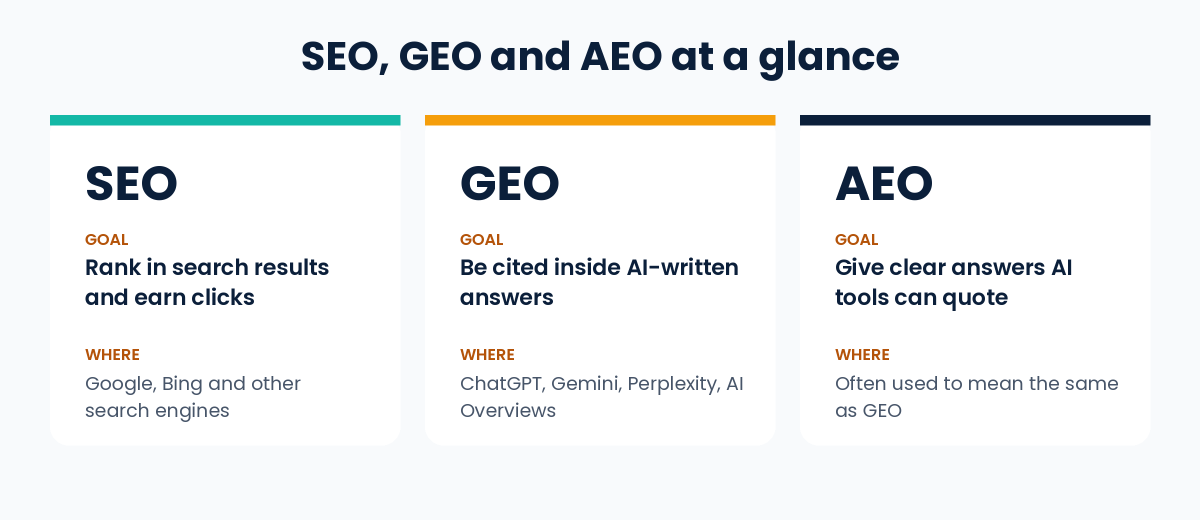
| SEO | GEO | AEO | |
|---|---|---|---|
| Main goal | Rank in search results and earn clicks | Be cited inside AI-written answers | Give clear answers AI tools can quote |
| Where it applies | Google, Bing and other search engines | ChatGPT, Gemini, Perplexity, Google AI features | Usually the same as GEO |
| Success looks like | Higher rankings and organic visits | Mentions and links in AI answers | Same as GEO |
GEO does not replace SEO. The two overlap heavily, and good SEO is the base that GEO builds on.
What Google Says About AI Features
This is the most important section for avoiding wasted money. Google’s official guides for site owners say:
- SEO is still the foundation. Google’s AI features are built on its core Search ranking and quality systems.
- How the features work. Google describes two techniques: retrieval-augmented generation (also called grounding), which pulls relevant pages from its Search index, and “query fan-out”, which runs several related searches on subtopics to build an answer.
- Eligibility. To be shown as a supporting link, a page must be indexed and eligible to be shown in Google Search with a snippet. Google says there are no additional technical requirements, and that indexing and serving are never guaranteed.
- No special files or markup. You do not need new machine-readable files, AI text files or special markup, and there is no special schema.org markup for AI features.
- What matters most. Google says creating unique, valuable content will likely influence your presence in generative AI search in the long run more than any other suggestion in its guide.
- Your control. Google says that, as of 31 August 2026, the Search generative AI control in Search Console is available to all websites. By default your site is included. You can choose to exclude it from AI Overviews, AI Mode and generative AI features in Discover, but then you receive no impressions or traffic from them.
Read Google’s own pages: Optimizing your website for generative AI features on Google Search, AI features and your website and Search generative AI control.
What Research Says Works
The term GEO comes from a 2024 research paper by researchers at Princeton, Georgia Tech, the Allen Institute for AI and IIT Delhi, presented at the KDD conference (read the paper). The researchers tested nine methods for changing a web page’s content. Their main findings:
- Adding citations from reliable sources, quotations from credible sources, and relevant statistics gave the biggest gains. On one of their measures, these raised visibility by roughly 30 to 40%.
- Clearer and more fluent writing also helped, by roughly 15 to 30%.
- Keyword stuffing gave little to no improvement, and a more persuasive, authoritative tone gave no significant improvement.
- Pages that ranked lower in normal search gained more than top-ranked pages.
Limits of this research: it used a test setup (an AI model answering from the top five Google results) and a check on Perplexity, not every live AI product. The tools in use today are different, and they change often. Use the findings as a good direction, not a guarantee.
8 Practical GEO Steps
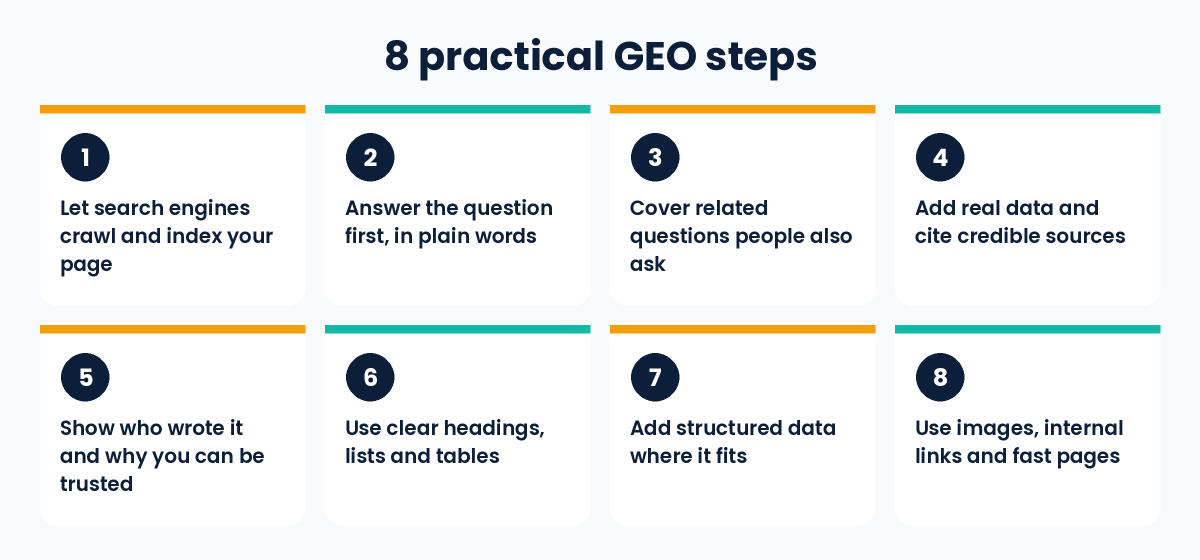
- Let search engines crawl and index your page. Allow crawling in robots.txt and on your hosting or CDN, remove accidental noindex tags, do not block snippets, and check the page is indexed in Google Search Console. A page that cannot be shown in Google Search with a snippet cannot be a supporting link.
- Start with a clear, direct answer. Put the main question in a heading and answer it plainly right below, then add detail. This helps readers who skim. Google says you do not need to break content into tiny pieces or write in a special way for AI.
- Cover natural follow-up questions on the same page. Think about what a reader would ask next and answer it. Google warns that creating separate pages for every possible query variation, mainly to influence rankings or AI answers, breaks its scaled content abuse spam policy.
- Add real data and cite credible sources. Link to official documentation and original research. Never invent statistics. This is the step with the strongest research support.
- Show who wrote it and why you can be trusted. Add an author name, role, real experience and a last-updated date. Google’s guide asks for a unique point of view and first-hand experience, not a summary of what is already online. These help readers decide whether to trust you. Google’s quality guidance describes this as E-E-A-T (experience, expertise, authoritativeness, trust), and Google says E-E-A-T is not itself a ranking factor.
- Use clear headings, short paragraphs, lists and tables. Google says people appreciate pages organised into sections with headings that make them easy to navigate.
- Add structured data where it fits. It is optional for AI features, and Google says to avoid overfocusing on it. It can still help with rich results in normal Search. Make sure it matches the visible text on the page.
- Use images, internal links and fast pages. Google’s guidance lists high-quality images and videos, internal links so your content is easy to find, and a good page experience. Keep important content in text form.
What to Skip and What GEO Cannot Do
For Google Search, Google’s guide says you can ignore these popular “hacks”:
- llms.txt files and other special markup. Google Search does not use them. It is fine to keep them for other services, but they neither help nor harm your visibility in Google Search.
- “Chunking” content into tiny pieces for AI.
- Rewriting content just for AI systems.
- Chasing inauthentic “mentions” across the web.
And remember the limits:
- GEO cannot guarantee citations. Nobody outside the AI companies knows the exact rules, and answers can change from one day to the next.
- It cannot replace good content. If your page has nothing original or useful, formatting changes will not help.
- It is not the same across tools. Google’s guidance covers Google’s AI features. ChatGPT, Perplexity and others may behave differently.
- Be careful with big promises. Google says no third-party tool has access to its internal ranking or AI systems, so be wary of tools or services that promise ranking success or claim to use internal Google data.
How to Measure GEO Results
- Google Search Console, Generative AI performance report: shows impressions your site gets in AI Overviews and AI Mode, by page, country, device and date. If you do not see the report, your site may not have enough impressions yet, or it may be excluded from these features.
- Google Search Console, Performance report: according to Google, clicks and impressions from AI features are also counted in your overall Web search totals.
- Google Analytics 4: check referral traffic from AI tools such as chatgpt.com or perplexity.ai. Volumes are often small, and some visits may not show a referrer.
- Manual checks: ask your target questions in a few AI tools and note whether your page is cited. Repeat monthly. Answers vary between runs, so look for patterns rather than single results.
Common Mistakes to Avoid
- Treating GEO as a replacement for SEO instead of building on it
- Writing generic content that repeats what everyone else already says
- Copying AI-written text without checking facts or adding your own experience
- Using statistics with no source
- Blocking crawlers or snippets by mistake, then wondering why pages never appear
- Spending money on hacks Google says it ignores
- Judging results from one or two test questions
Frequently Asked Questions
What is GEO in simple words?
GEO means preparing your content so AI tools can find it, understand it and cite it when they write answers to people’s questions.
Is GEO replacing SEO?
No. Google says SEO best practices still apply to its AI features, and that optimizing for generative AI search is still SEO from its point of view. GEO adds attention to being cited in AI answers.
Is GEO the same as AEO?
Mostly yes. Both terms describe optimizing for AI-generated answers, and many writers use them interchangeably.
Do I need special markup or files, such as llms.txt, for Google’s AI features?
No. Google says you do not need new machine-readable files, AI text files or special markup to appear in its AI features, and that Google Search ignores llms.txt files.
Can I stop my site from appearing in AI Overviews?
Yes. Search Console has a Search generative AI control that lets you exclude your site from AI Overviews, AI Mode and generative AI features in Discover. You will then get no impressions or traffic from those features. Google says this control is not a ranking signal for other parts of Search.
How long does GEO take to work?
There is no fixed time. It depends on your site, your competition and how often the AI tools refresh. Track progress over months, not days.
Can a small business website benefit from GEO?
Yes, if you publish clear, original and well-sourced content on topics where you have real experience. There are no guarantees, but this is also what good SEO asks for.
Conclusion
GEO is best understood as SEO adapted for AI answers. The foundation is the same: crawlable pages, helpful and original content, clear structure and visible trust. The extra focus is on answering questions directly, backing claims with real sources, and showing real experience.
To go deeper, read our guide on what is performance marketing, start with our basic guide on what is SEO, or see our SEO services for professional help.
Sources and further reading:
- Optimizing your website for generative AI features on Google Search (Google Search Central)
- AI features and your website (Google Search Central)
- Search generative AI control (Search Console Help)
- Generative AI performance report (Search Console Help)
- GEO: Generative Engine Optimization (Aggarwal et al., KDD 2024)
- PPC Land: summary of the Agarwal and Sen AI Overviews experiment