Core Benefit of Google Ads Automated Bidding Explained

Core benefit of Google Ads automated bidding: it sets bids for you, uses live signals and works toward your goal

Last updated: November 4, 2026

The core benefit of Google Ads automated bidding is that it sets your bids for you. Instead of changing bids by hand for each keyword or ad group, Google Ads sets a bid for each auction, aiming at the goal you choose, such as more conversions or a better return on ad spend. This removes manual work and guesswork from bidding.

In this guide, you will learn what automated bidding is, how it differs from Smart Bidding, which strategy fits which goal, what you need before using it, and where it can fall short. Everything is checked against Google’s own Google Ads Help pages, and the section on recent changes shows what is new in 2025 and 2026.

What Is Automated Bidding in Google Ads?

A bid is the amount you are willing to pay in a Google Ads auction. With manual bidding, you decide the bids yourself. With automated bidding, Google Ads decides them for you.

Google explains that it sets each bid based on how likely the ad is to lead to a click or a conversion that helps you reach your goal. Automated bid strategies also learn as they go: they use how earlier bids performed to improve later ones.

The Core Benefit of Google Ads Automated Bidding, Explained

The core benefit is simple: you tell Google Ads what you want, and it handles the bidding. You do not need to update bids for every keyword or ad group yourself.

This matters because the right bid changes from one search to the next. Who is searching, on which device, from which place and at what time all affect how likely a click is to turn into a sale or a lead. A person cannot adjust bids for each of those situations. Automated bidding can.

Google gives this example: for a restaurant, a search at 8 PM on a Thursday may be more likely to lead to a weekend booking than a search at 8 AM on a Monday. The bid can reflect that difference.
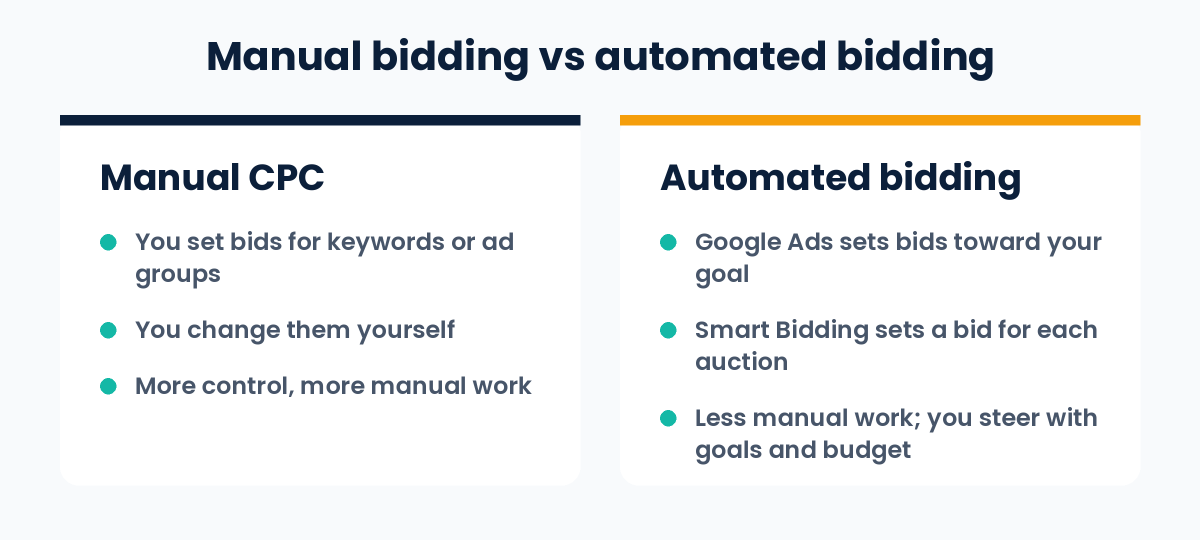
Manual bidding versus automated bidding in Google Ads: who sets the bids and how much manual work is involved

What Else Does It Give You?

Google lists four key benefits for Smart Bidding, the conversion-focused type of automated bidding. They can help you save time and improve performance:

  1. Advanced machine learning. The algorithms learn from data on a very large scale. They consider more factors than a single person or team could work through by hand.
  2. A wide range of contextual signals. Signals are facts about the person and their situation at the time of the auction, such as device, location, time of day, browser, operating system and language.
  3. Flexible performance controls. You set the targets and settings that match your goals. For example, you can optimise to your chosen attribution model, and you can set device-specific targets with Target CPA.
  4. Transparent reporting. Bid strategy reports, bid strategy statuses, experiments, simulators and alerts help you see what is happening and spot problems.

Google also says Smart Bidding can use search-query-level conversion data across your account. This helps it bid more accurately on keywords that do not have much data of their own.

Automated Bidding vs Smart Bidding

These two terms are often mixed up. Here is how Google separates them:

  • Automated bidding is the wider group. It includes every strategy where Google Ads sets bids toward a goal.
  • Smart Bidding is the part of it that uses Google AI to optimise for conversions or conversion value in every auction. Google calls this “auction-time bidding”.

Target CPA, Target ROAS, Maximize conversions and Maximize conversion value are Smart Bidding strategies. Maximize clicks and Target impression share are also automated, but Google says they do not include auction-time bidding.

The Main Automated Bid Strategies

Strategy What it aims for Smart Bidding?
Maximize clicks As many clicks as possible within your budget No
Target impression share Showing your ad at the absolute top, the top or anywhere on the Search results page (Search Network only) No
Maximize conversions As many conversions as possible within your budget Yes
Target CPA As many conversions as possible at the cost per action you set Yes
Maximize conversion value As much conversion value as possible within your budget Yes
Target ROAS As much conversion value as possible at the return on ad spend you set Yes

Some campaign types have extra options. For example, Target CPC is available only for Demand Gen campaigns. Google also notes that these targets are goals, not promises: some conversions may cost more or less than your target.

New to CPA and ROAS? Our guide on what is performance marketing explains both with a simple example.
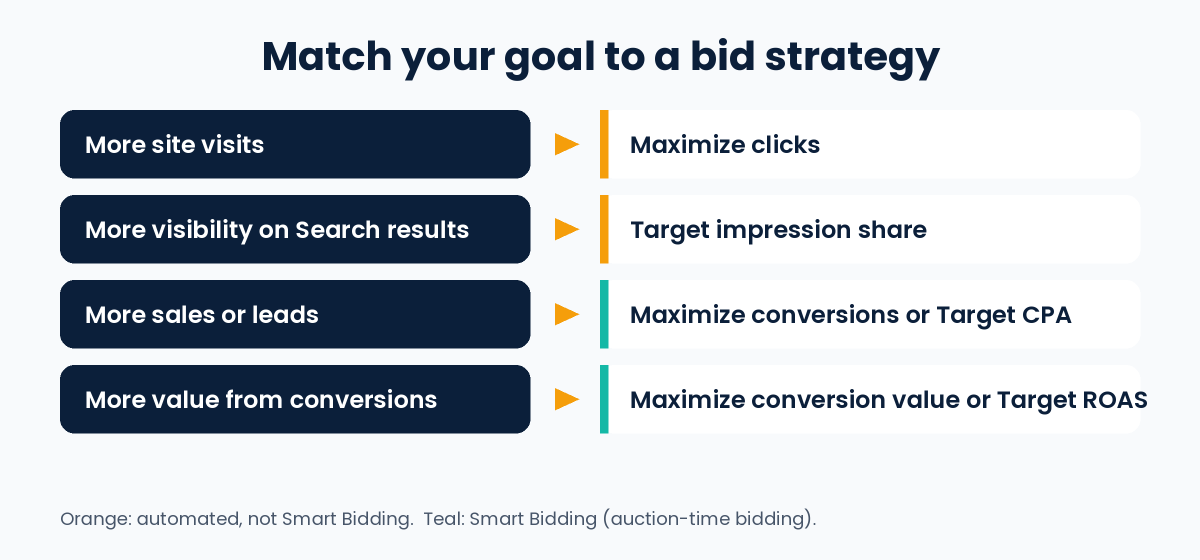
Matching a goal to a Google Ads bid strategy: Maximize clicks for visits, Target impression share for visibility, Maximize conversions or Target CPA for sales and leads, Maximize conversion value or Target ROAS for value

How to Choose a Strategy for Your Goal

Google’s guidance matches goals to strategies like this:

  • More site visits: Maximize clicks
  • More visibility on Search results: Target impression share
  • More sales or leads: Maximize conversions or Target CPA
  • More value or profit from conversions: Maximize conversion value or Target ROAS

If your conversions are worth different amounts, for example products with different prices, a value-based strategy fits better. For that, you need conversion values set up in your account.

What You Need Before You Start

  • Conversion tracking. Google says you need conversion tracking enabled to use Smart Bidding. The system learns from the conversions you record.
  • Enough data to judge results. You can turn on Smart Bidding without earlier data. For a fair evaluation, Google recommends looking at a longer period with at least 30 conversions, such as a month or more (50 conversions for Target ROAS).
  • A realistic target and budget. A target that is too tight or a budget that is too small can limit results.
  • Policy compliance. Google says you are responsible for making sure your use of Smart Bidding follows its advertising policies and applicable laws.

Google also says Smart Bidding can use data from all your campaigns, so even a new campaign without its own data may see better performance.

Limits and Things to Watch

Automated bidding is useful, but it is not a magic switch.

  • Results depend on your conversion data. The system optimises for the conversions you record. If tracking is wrong or counts the wrong actions, it will optimise for the wrong thing.
  • You steer, you do not drive. You control goals, targets and budget, not each individual bid.
  • Targets are not guarantees. Google says actual results can be higher or lower than the target you set.
  • It needs time. Google advises monitoring performance closely when you change strategy, because bidding adjusts gradually.
  • Budget changes can move your costs. Without a target, Maximize conversions and Maximize conversion value aim to spend your full budget, so your actual CPA or ROAS can change when you change the budget.

What Has Changed Recently

Google keeps updating how bidding works. These changes are documented in Google Ads Help:

  • Enhanced CPC is gone. From the week of 31 March 2025, Enhanced CPC is no longer available for Search and Display campaigns. Campaigns that were not moved to another strategy now effectively use Manual CPC.
  • Strategy labels are changing from June 2026. “Maximize conversions with a Target CPA” is being relabelled “Target CPA”, and “Maximize conversion value with a Target ROAS” is being relabelled “Target ROAS”. During the transition, the names you see may differ slightly. Google says the bidding behaviour stays exactly the same and you do not need to take any action.
  • Target-based bidding changed on 17 August 2026. Campaigns that are limited by budget and use Target CPA or Target ROAS now aim more consistently at the target you set, including when you change budgets. If a campaign was beating its target before, it may now deliver closer to the target. Google’s example uses US dollars with a 2-to-1 gap between target and actual cost. In rupees, the same idea is a target CPA of ₹100 with a recent actual CPA of ₹50: the campaign now delivers closer to ₹100. Google will not change your targets or budgets for you, so review them.

How to Set Up Automated Bidding

  1. Set up conversion tracking for the actions that matter to you, such as purchases or enquiry forms.
  2. Pick one clear goal: clicks, visibility, conversions or conversion value.
  3. Choose the matching strategy from the table above.
  4. Set your target and budget. If you use a target, base it on your real costs and margins.
  5. Apply it. You can choose a strategy when you create a campaign or change it in the campaign settings. In your account, go to Tools, then Budgets and bidding, then Bid strategies to create or manage strategies. A portfolio bid strategy can cover several campaigns.
  6. Monitor, then judge. Use the bid strategy reports and give the system time. Judge results over a longer period, not after a few days.
  7. Test if you are unsure. For Search and Display campaigns, campaign experiments let you compare Smart Bidding with your current method.

One tip from Google: broad match keywords pair well with Smart Bidding strategies, because the system sets a separate bid for each query. Test this against your own results before relying on it.

Common Mistakes to Avoid

  • Switching on automated bidding without working conversion tracking
  • Judging results after only a few days or a handful of conversions
  • Setting a target CPA or ROAS that is far from what your business can really achieve
  • Changing the strategy, target and budget all at the same time, so you cannot tell what caused a change
  • Counting low-value actions as conversions, so the system chases the wrong results
  • Never reviewing targets and budgets after Google changes how a strategy works

Frequently Asked Questions

What is the core benefit of Google Ads automated bidding?

It sets bids for you to meet your performance goals, so you do not have to update bids by hand for each keyword or ad group. With Smart Bidding, it also sets a bid for every auction using many signals, which Google says can save time and improve performance.

Is automated bidding the same as Smart Bidding?

No. Automated bidding is the wider group. Smart Bidding is the part that optimises for conversions or conversion value using auction-time bidding. Maximize clicks and Target impression share are automated but are not Smart Bidding.

Does automated bidding guarantee better results?

No. Google says it can help save time and improve performance, but results depend on your conversion data, targets, budget and the competition. Targets are goals, not guarantees.

How many conversions do I need for Smart Bidding?

You can start without earlier data. For a fair evaluation, Google recommends at least 30 conversions over a month or longer, and 50 for Target ROAS. Check the help page for each strategy, because recommendations vary by campaign type.

Do I need conversion tracking?

Yes, for Smart Bidding. Without it, the system has nothing to learn from.

Can I still control my bids?

You control the goal, the target and the budget, but not individual bids. If you want to set each bid yourself, you need Manual CPC bidding.

Which strategy should I use to get leads?

Google suggests Maximize conversions or Target CPA when your goal is more sales or leads.

I am preparing for a Google Ads exam. Which answer should I choose?

Exam options can be worded differently. Look for the answer that matches the idea above: automated bidding sets bids for you toward your goal, which saves manual work. Always read all the options carefully.

Conclusion

The core benefit of Google Ads automated bidding is that it handles the bidding for you, aiming at the goal you choose. Smart Bidding goes further by setting a bid for each auction using live signals. To get value from it, set up accurate conversion tracking, pick a strategy that matches your goal, give it enough time and data, and review your targets and budgets regularly.

If you would like help running your campaigns, see our Google Ads services.

Sources and further reading (Google Ads Help):
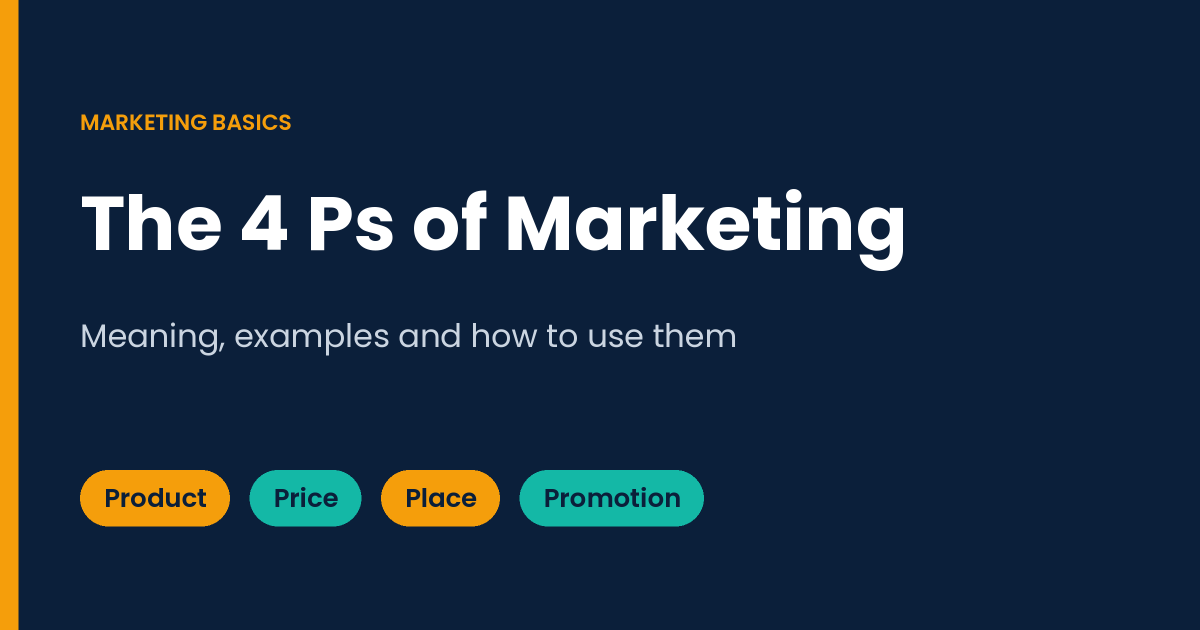
4 Ps of Marketing: Meaning, Examples and How to Use Them

The 4 Ps of marketing: product, price, place and promotion, guide cover

Last updated: November 4, 2026

The 4 Ps of marketing are product, price, place and promotion. Together they are called the marketing mix: four decisions a business controls to meet customer needs and sell what it offers.

In this guide, you will learn what each P means, see simple examples, follow a step-by-step way to use the 4 Ps, and understand how they compare with the 7 Ps and the 4 Cs. The examples are made up for illustration. The history is checked against the original sources listed at the end.

What Are the 4 Ps of Marketing?

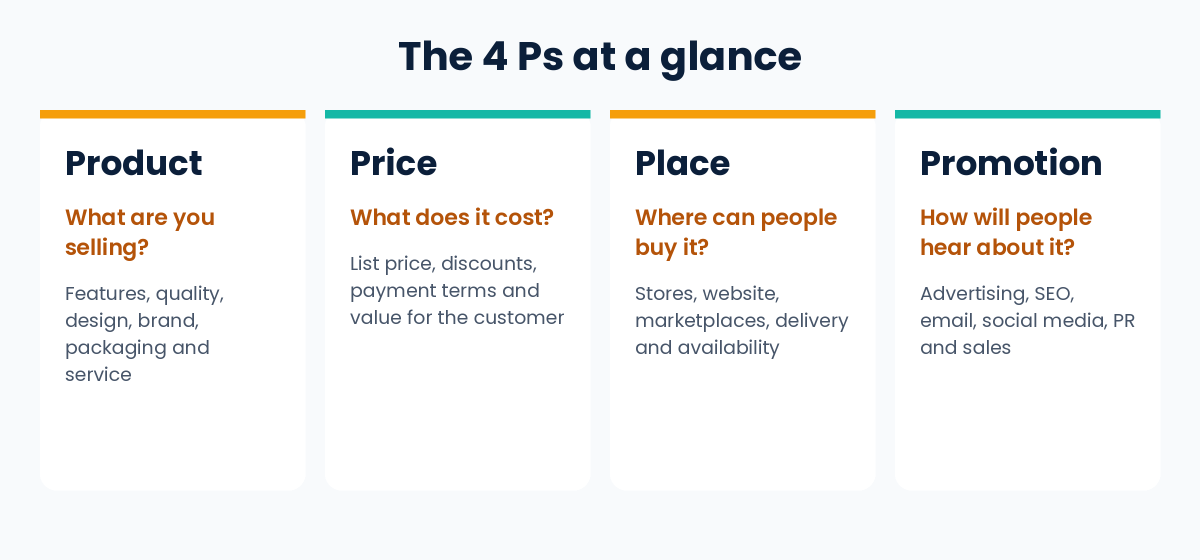
The 4 Ps are a checklist for planning how you take a product or service to market. Each P answers one simple question:

The P The question it answers Typical decisions
Product What are you selling? Features, quality, design, brand, packaging, service
Price What does it cost the customer? List price, discounts, payment terms
Place Where and how can people buy it? Stores, website, marketplaces, delivery, availability
Promotion How will people hear about it? Advertising, SEO, email, social media, PR, sales

These are things a business can control, which is why the framework is called the marketing mix. You can change your product, price, place and promotion. You cannot directly control what customers think or what the economy does.

The 4 Ps of marketing at a glance: product, price, place and promotion with the question each one answers

Where the 4 Ps Come From

  • Harvard professor Neil Borden popularized the term “marketing mix”. He said he had used the term since the late 1940s, spoke about it in a 1953 American Marketing Association address, and published “The Concept of the Marketing Mix” in 1964, which made the idea widely known. His list had at least twelve elements.
  • E. Jerome McCarthy simplified the idea into four groups in his 1960 textbook Basic Marketing: A Managerial Approach. Those four groups are product, price, place and promotion.

The simple four-part version became one of the most widely taught frameworks in marketing, because it is easy to remember and easy to apply.

1. Product: What You Sell

Your product is what you offer to solve a customer’s problem. It includes more than the item itself:

  • Features and quality
  • Design and brand
  • Packaging
  • Customer service, warranty and returns

Questions to ask: What problem does it solve? Who is it for? Why would someone choose it over the alternatives? What support do customers get after buying?

Example (made up): A neighborhood bakery sells sourdough bread and custom cakes. Its product is not just the bread. It is the taste, the freshness, the packaging and the friendly service.

For digital products such as software, apps and online courses, the product includes the features, how easy it is to use, and how often it improves.

2. Price: What Customers Pay

Price is the amount a customer pays. It also includes discounts, payment terms and financing options. Customers often “pay” with time and effort too, not only money. Price also sends a signal about quality, so a price that is too low can make a product look cheap.

Three common ways to set a price:

Approach How it works Watch out for
Cost-plus Your cost plus a markup It ignores what customers think the product is worth
Competitor-based Set your price in relation to competitors You need a clear reason to be cheaper, equal or more expensive
Value-based Set the price by the value customers see It needs real customer research

Whatever method you use, check that the price covers your costs and leaves a profit.

Example (made up): The bakery prices its bread a little above supermarket bread, because its ingredients cost more and customers value freshness. It offers a small discount to people who pre-order for the week.

3. Place: Where and How Customers Can Buy

Place is how your product reaches customers. It covers where people can buy it, how easy it is, and whether it is in stock when they want it. Examples include your own shop, your website, online marketplaces, app stores, distributors and delivery services.

For local businesses, being easy to find matters. Google says that keeping your Business Profile details up to date can help your business be visible in Google Search results.

Example (made up): The bakery sells in its shop, takes pre-orders through its website, and delivers locally on weekends.

4. Promotion: How People Hear About You

Promotion is every way you communicate with customers and move them toward a decision. It includes:

  • Advertising, online and offline
  • Content and search engine optimization (SEO)
  • Email and social media
  • Public relations and partnerships
  • Sales promotions and personal selling

Keep your message consistent across channels, and track results so you know what works. For measurable paid campaigns, read our guide on what is performance marketing. To bring in visitors from search, see our beginner guide on what is SEO.

Promotion is the P most people think of first. A common mistake is to spend most of the effort here and neglect the other three.

Worked Example: The 4 Ps for a Neighborhood Bakery

This is a made-up example to show how the four decisions fit together.

P The bakery’s decision
Product Fresh sourdough and custom cakes, made with quality ingredients
Price A little above supermarket prices, with a discount for weekly pre-orders
Place The shop, a pre-order page on its website, and local weekend delivery
Promotion An up-to-date Google Business Profile, photos on social media, and an email list for pre-orders

How the 4 Ps Work Together

The four Ps only work well when they point in the same direction. Here are three common mismatches:

  • A premium product with constant deep discounts confuses customers about its quality.
  • A great product that is hard to find or buy loses sales, however good the advertising is.
  • Strong promotion for a product that does not solve a real problem brings visitors who do not buy.

The 4 Ps of Marketing in Digital Marketing

The framework is the same online. Only the examples change:

P Digital examples
Product Software features, app experience, free trials, online courses
Price Subscriptions, free plans, bundles, discount codes
Place Your website, app stores, online marketplaces, social media shops, local listings
Promotion SEO, paid ads, email, social media, content, influencer partnerships

Digital tools such as Google Analytics make it easier to measure promotion. They do not change what the four decisions are.

How to Use the 4 Ps of Marketing, Step by Step

  1. Define your target customer. Who are you trying to help, and what do they need?
  2. Learn about customers and competitors. Use surveys, customer reviews, sales data and competitor websites.
  3. Shape the product around a real problem. Be able to say in one sentence why customers should choose it.
  4. Set a price you can defend. Consider your costs, the value to customers and competitors’ prices.
  5. Choose where and how people buy. Make buying as easy as you can for your target customer.
  6. Plan your promotion and measure it. Pick channels where your customers already spend time, and track results.
  7. Review all four together. Revisit them regularly, because a change in one P often affects the others.

4 Ps vs 4 Cs vs 7 Ps

Model Created by Elements Best for
4 Ps E. Jerome McCarthy, 1960 Product, price, place, promotion Planning from the seller’s side
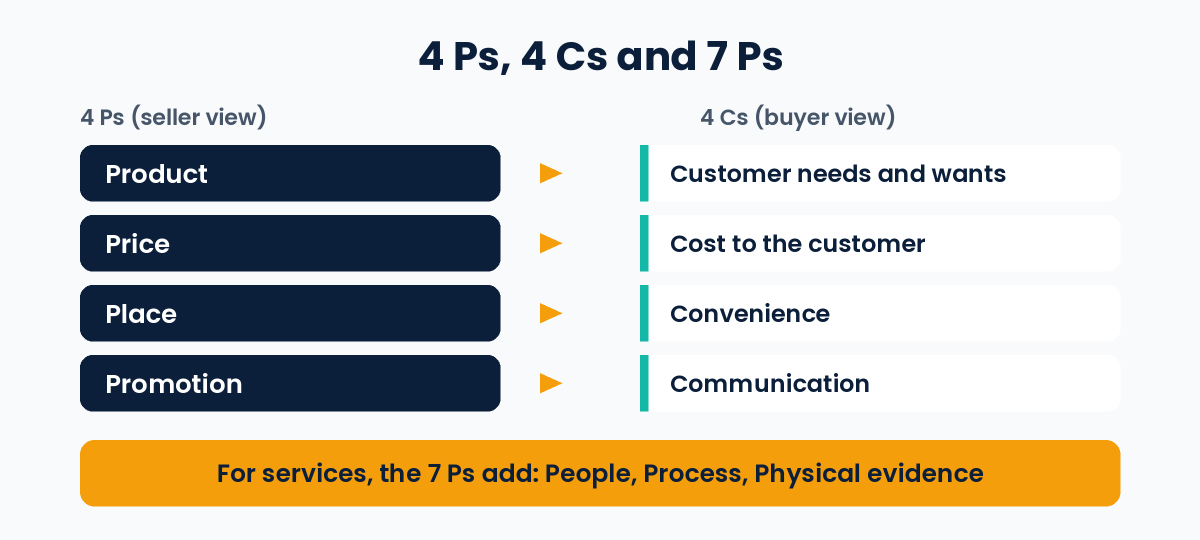
4 Cs Robert Lauterborn, 1990 Customer needs and wants, cost, convenience, communication Looking at the same decisions from the buyer’s side
7 Ps Bernard Booms and Mary Jo Bitner, 1981 The 4 Ps plus people, process and physical evidence Service businesses

The 4 Cs match the 4 Ps one to one: product becomes customer needs and wants, price becomes cost, place becomes convenience, and promotion becomes communication. They are not a replacement. They are a second way to check the same decisions.

How the 4 Ps map to the 4 Cs: product to customer needs, price to cost, place to convenience, promotion to communication. The 7 Ps add people, process and physical evidence for services

A 10-Minute 4 Ps Check for Your Own Business

Answer each question in one sentence. If you cannot answer one, that is your next research task.

  1. Product: Which customer problem does it solve, in one sentence?
  2. Product: What do customers say they like or dislike about it? Check reviews, messages and returns.
  3. Product: What makes it different from the closest alternative?
  4. Price: What is your cost per sale, and how much profit is left at your current price? Our guide on performance marketing shows how to work out break-even numbers.
  5. Price: How does your price compare with the alternatives your customers really consider, and why?
  6. Place: Where do your customers already look for products like yours?
  7. Place: What is the easiest way to buy, and at which step do people give up?
  8. Promotion: Which one or two channels reach your customers today, and how do you know?
  9. Promotion: Is your message the same on your website, ads and social media?
  10. Fit: Do all four point the same way? A premium product, a bargain price and a hard-to-find shop would not.

Limits of the 4 Ps

  • It is a checklist, not a strategy. It tells you what to decide, not what to choose.
  • It starts from the seller’s side. It does not ask about customers by itself, which is one reason the 4 Cs were created.
  • It was created in 1960, when most marketing was about physical goods. Services need extra thinking, which is why the 7 Ps exist.
  • It does not replace research. You still need real information about your customers and competitors.

Common Mistakes to Avoid

  • Filling in the four Ps without researching real customers
  • Copying a competitor’s price without checking your own costs
  • Spending most of the effort on promotion and ignoring the other three
  • Changing one P without checking how it affects the others
  • Never reviewing the mix after the first plan

Frequently Asked Questions

What are the 4 Ps of marketing?

The 4 Ps of marketing are product, price, place and promotion. They are the four main decisions a business makes when taking something to market.

Who created the 4 Ps of marketing?

E. Jerome McCarthy presented the 4 Ps in his 1960 textbook Basic Marketing: A Managerial Approach. He built on the earlier marketing mix idea popularized by Neil Borden.

What is the difference between the 4 Ps and the marketing mix?

The marketing mix is the broader idea: the set of elements a business controls to reach its customers. The 4 Ps are the most common version of it. Other versions exist, such as the 7 Ps for services.

Are the 4 Ps of marketing still relevant?

Yes, as a simple planning checklist. They are still widely taught and used. For services you may need the 7 Ps, and you should always combine the framework with real customer research.

What is the fifth P of marketing?

There is no single official fifth P. Many sources add people as the fifth P. For services, Booms and Bitner added three: people, process and physical evidence, which gives the 7 Ps. Some writers propose other Ps, so check which model a course or book is using.

Which of the 4 Ps is the most important?

No single P is the most important. They have to fit together. A good starting point is the product, because it should solve a real customer problem before you decide how to price, sell and promote it.

Conclusion

The 4 Ps of marketing give you a simple way to organize your thinking: what you sell, what it costs, where people can buy it, and how they hear about it. Use them as a checklist, back each decision with real customer information, and review all four together.

For the next step, learn how to measure your promotion in our guide on what is performance marketing, or read how AI search is changing visibility in our guide to generative engine optimization.

Sources and further reading:

What Is Generative Engine Optimization? Simple GEO Guide

What is generative engine optimization? Beginner guide cover

Last updated: November 4, 2026

Generative Engine Optimization (GEO) is the practice of making your content easy for AI tools to find, understand and cite in their answers. These tools include Google AI Overviews, Google AI Mode, ChatGPT, Gemini and Perplexity.

In this guide, you will learn what GEO means, how it differs from SEO, what Google itself says about it, what research shows, and practical steps you can follow. Where the evidence is weak or mixed, the guide says so.

What Is Generative Engine Optimization (GEO)?

When you ask an AI tool a question, it often writes a direct answer instead of showing only a list of links. Many of these answers mention or link to the web pages they used. GEO is about making your page one of those sources.

You will also see the term AEO (Answer Engine Optimization). In practice, most people use GEO and AEO to mean the same thing.

An honest note: GEO is an industry term, not an official Google term. Google’s own guide says that, from its perspective, optimizing for generative AI search is still SEO.

Why GEO Matters Now

Google now shows AI-written answers, called AI Overviews, on a share of searches. It also offers AI Mode, a chat-style search where people can ask follow-up questions. Google says AI Overviews appear only when they add something beyond classic search, so they often do not appear.

Researchers have tried to measure what this does to clicks:

  • A randomized field experiment by Saharsh Agarwal (Indian School of Business) and Ananya Sen (Carnegie Mellon University), posted on SSRN in 2026, tested 1,065 US desktop Chrome users. When an AI Overview was shown, outbound organic clicks fell by 39.8%, and searches ending with no website visit rose by 34.5%. Clicks on ads did not change (as summarised by PPC Land).
  • Limits: the participants were US desktop users, and AI Overviews appeared on about 41% of the searches in the test. Results for mobile users, India or later versions of Google may differ.
  • Studies using other methods report different numbers, so treat any single percentage with care. The direction is consistent: AI answers can reduce clicks to websites.
  • Google says clicks from pages with AI Overviews tend to be higher quality. The same study, as summarised by PPC Land, found that the extra clicks seen when AI Overviews were hidden were just as engaged as the existing clicks, which challenges that claim. Google’s statement is its own and is not independently confirmed.

The practical meaning: ranking alone may bring fewer visits than before, and being cited in AI answers is becoming part of being found online.

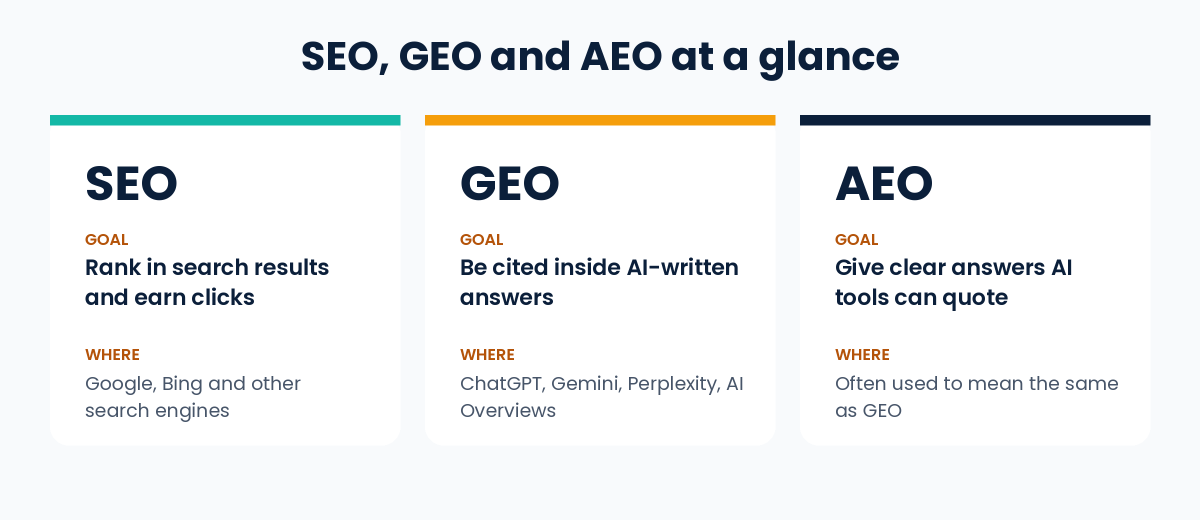
GEO vs SEO vs AEO

SEO GEO AEO
Main goal Rank in search results and earn clicks Be cited inside AI-written answers Give clear answers AI tools can quote
Where it applies Google, Bing and other search engines ChatGPT, Gemini, Perplexity, Google AI features Usually the same as GEO
Success looks like Higher rankings and organic visits Mentions and links in AI answers Same as GEO

GEO does not replace SEO. The two overlap heavily, and good SEO is the base that GEO builds on.

Comparison of SEO, GEO and AEO: goal and where each applies

What Google Says About AI Features

This is the most important section for avoiding wasted money. Google’s official guides for site owners say:

  • SEO is still the foundation. Google’s AI features are built on its core Search ranking and quality systems.
  • How the features work. Google describes two techniques: retrieval-augmented generation (also called grounding), which pulls relevant pages from its Search index, and “query fan-out”, which runs several related searches on subtopics to build an answer.
  • Eligibility. To be shown as a supporting link, a page must be indexed and eligible to be shown in Google Search with a snippet. Google says there are no additional technical requirements, and that indexing and serving are never guaranteed.
  • No special files or markup. You do not need new machine-readable files, AI text files or special markup, and there is no special schema.org markup for AI features.
  • What matters most. Google says creating unique, valuable content will likely influence your presence in generative AI search in the long run more than any other suggestion in its guide.
  • Your control. Google says that, as of 31 August 2026, the Search generative AI control in Search Console is available to all websites. By default your site is included. You can choose to exclude it from AI Overviews, AI Mode and generative AI features in Discover, but then you receive no impressions or traffic from them.

Read Google’s own pages: Optimizing your website for generative AI features on Google Search, AI features and your website and Search generative AI control.

What Research Says Works

The term GEO comes from a 2024 research paper by researchers at Princeton, Georgia Tech, the Allen Institute for AI and IIT Delhi, presented at the KDD conference (read the paper). The researchers tested nine methods for changing a web page’s content. Their main findings:

  • Adding citations from reliable sources, quotations from credible sources, and relevant statistics gave the biggest gains. On one of their measures, these raised visibility by roughly 30 to 40%.
  • Clearer and more fluent writing also helped, by roughly 15 to 30%.
  • Keyword stuffing gave little to no improvement, and a more persuasive, authoritative tone gave no significant improvement.
  • Pages that ranked lower in normal search gained more than top-ranked pages.

Limits of this research: it used a test setup (an AI model answering from the top five Google results) and a check on Perplexity, not every live AI product. The tools in use today are different, and they change often. Use the findings as a good direction, not a guarantee.

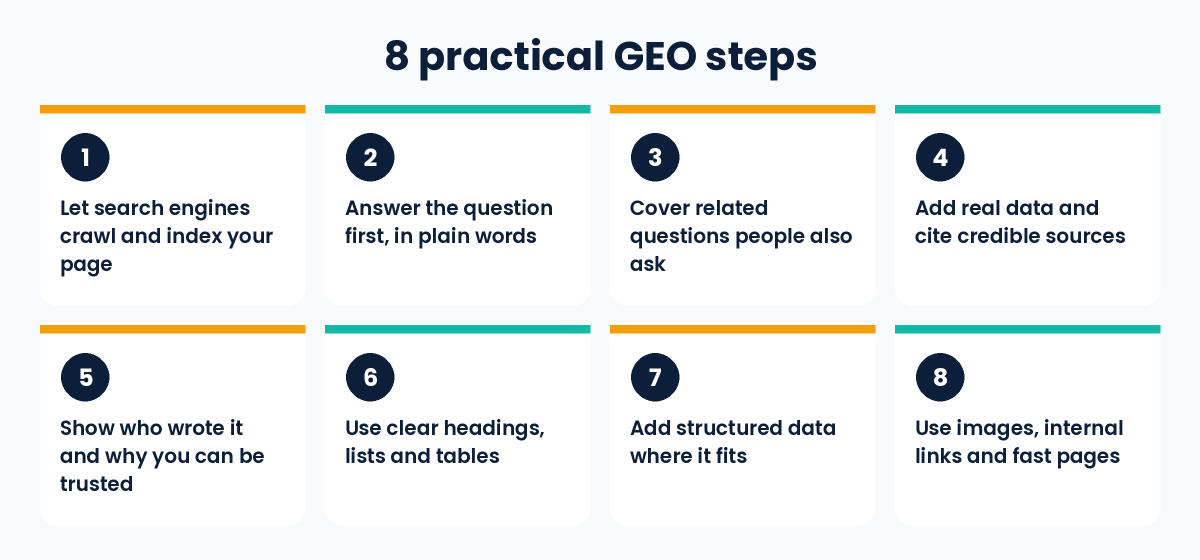
8 Practical GEO Steps

  1. Let search engines crawl and index your page. Allow crawling in robots.txt and on your hosting or CDN, remove accidental noindex tags, do not block snippets, and check the page is indexed in Google Search Console. A page that cannot be shown in Google Search with a snippet cannot be a supporting link.
  2. Start with a clear, direct answer. Put the main question in a heading and answer it plainly right below, then add detail. This helps readers who skim. Google says you do not need to break content into tiny pieces or write in a special way for AI.
  3. Cover natural follow-up questions on the same page. Think about what a reader would ask next and answer it. Google warns that creating separate pages for every possible query variation, mainly to influence rankings or AI answers, breaks its scaled content abuse spam policy.
  4. Add real data and cite credible sources. Link to official documentation and original research. Never invent statistics. This is the step with the strongest research support.
  5. Show who wrote it and why you can be trusted. Add an author name, role, real experience and a last-updated date. Google’s guide asks for a unique point of view and first-hand experience, not a summary of what is already online. These help readers decide whether to trust you. Google’s quality guidance describes this as E-E-A-T (experience, expertise, authoritativeness, trust), and Google says E-E-A-T is not itself a ranking factor.
  6. Use clear headings, short paragraphs, lists and tables. Google says people appreciate pages organised into sections with headings that make them easy to navigate.
  7. Add structured data where it fits. It is optional for AI features, and Google says to avoid overfocusing on it. It can still help with rich results in normal Search. Make sure it matches the visible text on the page.
  8. Use images, internal links and fast pages. Google’s guidance lists high-quality images and videos, internal links so your content is easy to find, and a good page experience. Keep important content in text form.
Eight practical GEO steps: crawlability, answer first, related questions, data and sources, trust signals, clear structure, structured data, images and fast pages

What to Skip and What GEO Cannot Do

For Google Search, Google’s guide says you can ignore these popular “hacks”:

  • llms.txt files and other special markup. Google Search does not use them. It is fine to keep them for other services, but they neither help nor harm your visibility in Google Search.
  • “Chunking” content into tiny pieces for AI.
  • Rewriting content just for AI systems.
  • Chasing inauthentic “mentions” across the web.

And remember the limits:

  • GEO cannot guarantee citations. Nobody outside the AI companies knows the exact rules, and answers can change from one day to the next.
  • It cannot replace good content. If your page has nothing original or useful, formatting changes will not help.
  • It is not the same across tools. Google’s guidance covers Google’s AI features. ChatGPT, Perplexity and others may behave differently.
  • Be careful with big promises. Google says no third-party tool has access to its internal ranking or AI systems, so be wary of tools or services that promise ranking success or claim to use internal Google data.

How to Measure GEO Results

  • Google Search Console, Generative AI performance report: shows impressions your site gets in AI Overviews and AI Mode, by page, country, device and date. If you do not see the report, your site may not have enough impressions yet, or it may be excluded from these features.
  • Google Search Console, Performance report: according to Google, clicks and impressions from AI features are also counted in your overall Web search totals.
  • Google Analytics 4: check referral traffic from AI tools such as chatgpt.com or perplexity.ai. Volumes are often small, and some visits may not show a referrer.
  • Manual checks: ask your target questions in a few AI tools and note whether your page is cited. Repeat monthly. Answers vary between runs, so look for patterns rather than single results.

Common Mistakes to Avoid

  • Treating GEO as a replacement for SEO instead of building on it
  • Writing generic content that repeats what everyone else already says
  • Copying AI-written text without checking facts or adding your own experience
  • Using statistics with no source
  • Blocking crawlers or snippets by mistake, then wondering why pages never appear
  • Spending money on hacks Google says it ignores
  • Judging results from one or two test questions

Frequently Asked Questions

What is GEO in simple words?

GEO means preparing your content so AI tools can find it, understand it and cite it when they write answers to people’s questions.

Is GEO replacing SEO?

No. Google says SEO best practices still apply to its AI features, and that optimizing for generative AI search is still SEO from its point of view. GEO adds attention to being cited in AI answers.

Is GEO the same as AEO?

Mostly yes. Both terms describe optimizing for AI-generated answers, and many writers use them interchangeably.

Do I need special markup or files, such as llms.txt, for Google’s AI features?

No. Google says you do not need new machine-readable files, AI text files or special markup to appear in its AI features, and that Google Search ignores llms.txt files.

Can I stop my site from appearing in AI Overviews?

Yes. Search Console has a Search generative AI control that lets you exclude your site from AI Overviews, AI Mode and generative AI features in Discover. You will then get no impressions or traffic from those features. Google says this control is not a ranking signal for other parts of Search.

How long does GEO take to work?

There is no fixed time. It depends on your site, your competition and how often the AI tools refresh. Track progress over months, not days.

Can a small business website benefit from GEO?

Yes, if you publish clear, original and well-sourced content on topics where you have real experience. There are no guarantees, but this is also what good SEO asks for.

Conclusion

GEO is best understood as SEO adapted for AI answers. The foundation is the same: crawlable pages, helpful and original content, clear structure and visible trust. The extra focus is on answering questions directly, backing claims with real sources, and showing real experience.

To go deeper, read our guide on what is performance marketing, start with our basic guide on what is SEO, or see our SEO services for professional help.

Sources and further reading:

What Is Performance Marketing? How It Works and How to Start

What is performance marketing? Guide cover

Last updated: November 4, 2026

If you are asking what is performance marketing, the short answer is this: it is a type of digital marketing where you pay based on measurable actions, such as a click, a lead, a sale or an app install, and judge every campaign by those results, not by how many people simply saw your ad.

In this guide, you will learn how performance marketing works, which channels and metrics matter, where it falls short, and how to get started. The language is simple and there is no hype.

Performance Marketing Meaning

Performance marketing is a results-based approach to online advertising. You set a clear goal, run campaigns, and pay based on actions that can be measured. In the purest form (affiliate programs and cost-per-sale deals), you pay only when the action happens. On ad platforms such as Google and Meta, you often pay per click or per impression, and then measure the results.

Examples of an “action”:

  • A person clicks your ad
  • A person fills in a form (a lead)
  • A person buys a product
  • A person installs your app

The key idea is measurability. Spend can usually be linked to results, so you can see what works and stop what does not. Tracking is never perfect, as the limitations section below explains.

How Performance Marketing Works

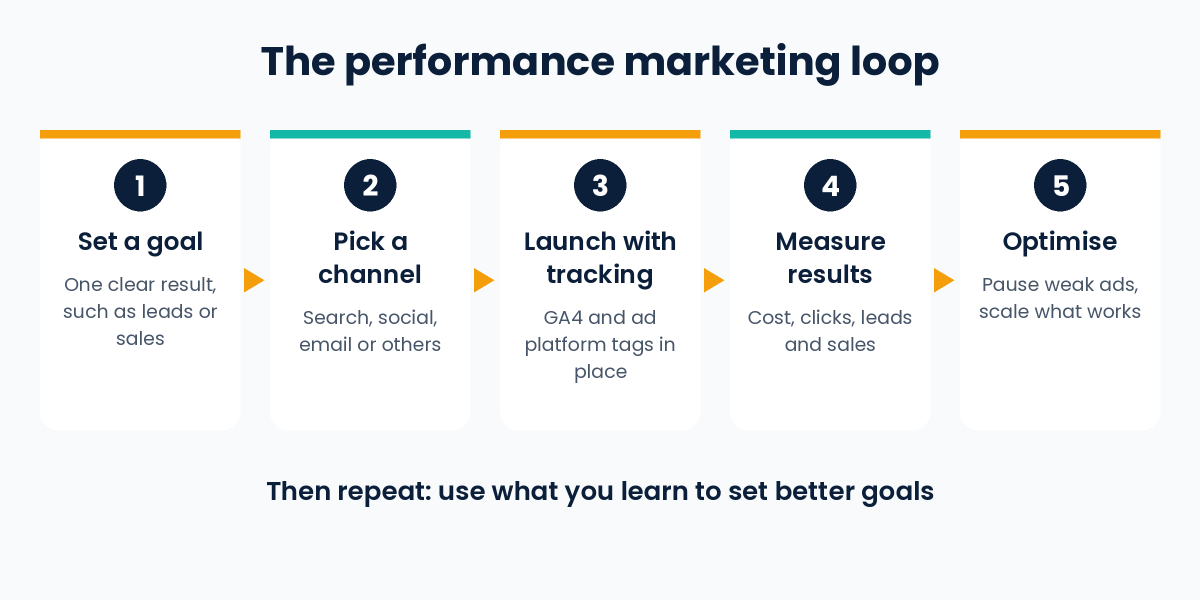
Most campaigns follow the same loop:

  1. Set a goal. For example, “get 100 enquiries this month at under ₹500 each.”
  2. Pick a channel. Choose where your audience spends time (search, social, email and so on).
  3. Launch ads with tracking. Install tracking tools such as Google Analytics 4 and the ad platform’s pixel or tag.
  4. Measure results. Check cost, clicks, leads and sales.
  5. Optimise. Pause weak ads, improve landing pages, test new creatives, and put more budget into what works.

This loop of test, measure and improve is the heart of the practice.

Five-step performance marketing loop: set a goal, pick a channel, launch with tracking, measure results, optimise

Common Payment Models

Model You pay for Typical use
CPC (cost per click) Each click on your ad Search and social ads
CPL (cost per lead) Each lead generated Education, real estate, services
CPA / CPS (cost per acquisition / sale) Each customer or sale E-commerce, affiliate programs
CPI (cost per install) Each app install Mobile apps
CPM (cost per 1,000 impressions) Every 1,000 views Awareness-focused campaigns

Note: some platforms charge per click or per impression even if your goal is a sale. The model you pay on and the result you want are not always the same, so check how each platform bills you.

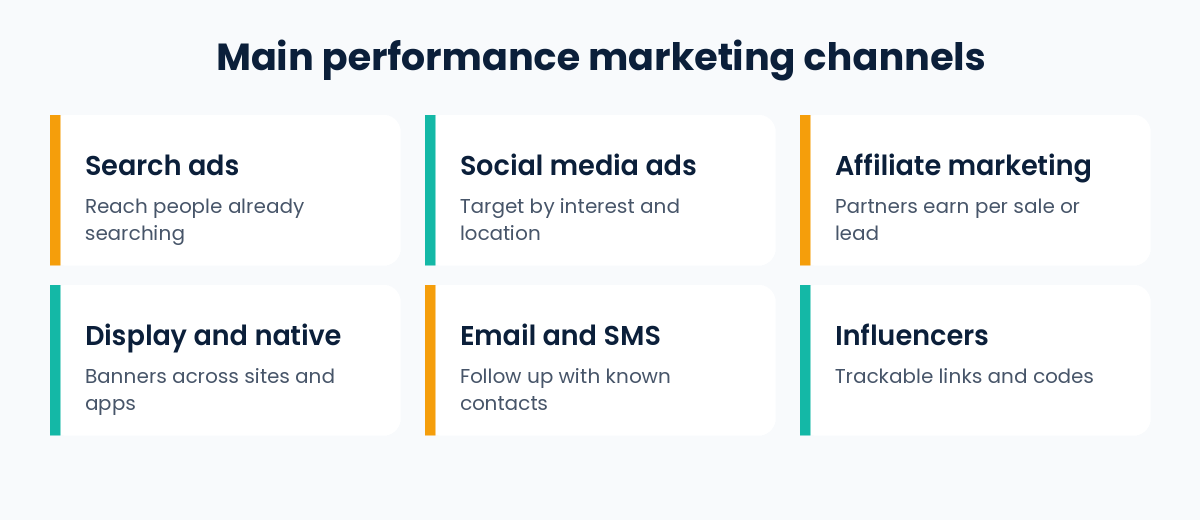
Main Performance Marketing Channels

  • Search ads (Google Ads): Reach people actively searching for what you offer.
  • Social media ads (Meta, LinkedIn, YouTube and others): Reach people by interest, behaviour and location.
  • Affiliate marketing: Partners promote your product and earn a commission per sale or lead.
  • Display and native ads: Banner and content-style ads across websites and apps.
  • Email and SMS marketing: Low-cost follow-up with people who already know you.
  • Influencer marketing (when tied to trackable links or codes): Creators promote your offer and you measure results through unique links.
Six main performance marketing channels: search ads, social media ads, affiliate marketing, display and native ads, email and SMS, influencers

SEO and organic content are not paid performance channels, but they work well alongside them and can lower your long-term cost of getting customers.

Key Metrics to Track

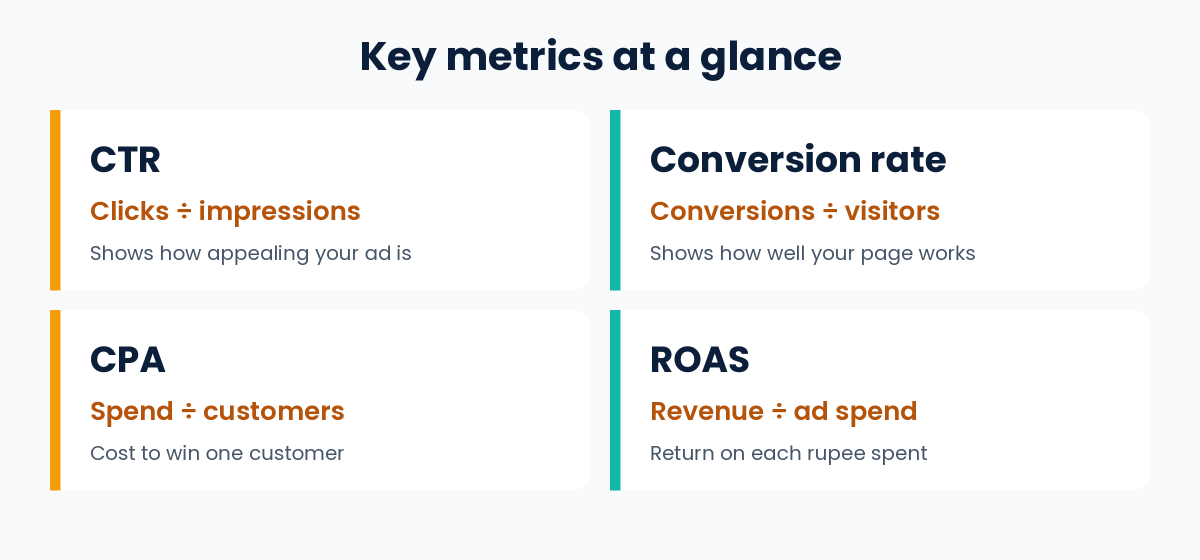
  • CTR (click-through rate): Clicks ÷ impressions. It shows how appealing your ad is.
  • Conversion rate: Conversions ÷ visitors. It shows how well your landing page works.
  • CPA / CPL: Total spend ÷ number of customers or leads.
  • ROAS (return on ad spend): Revenue from ads ÷ ad spend.
  • CAC (customer acquisition cost): Total cost of winning one customer, including all marketing costs.
  • LTV (lifetime value): Total revenue you can expect from one customer over time.
Key performance marketing metrics with simple formulas: CTR, conversion rate, CPA and ROAS

Simple example (illustrative numbers only): You spend ₹50,000 on ads and get 100 customers. Your CPA is ₹50,000 ÷ 100 = ₹500. If those customers bring ₹2,00,000 in revenue, your ROAS is ₹2,00,000 ÷ ₹50,000 = 4. That means ₹4 earned for every ₹1 spent. Whether that is good depends on your profit margin, not on the number alone.

Performance Marketing vs Brand Marketing

Performance marketing Brand marketing
Main goal Measurable actions (leads, sales) Awareness and trust
Payment Per click, lead, sale or install, depending on the deal Usually for reach, time or placement (for example CPM or sponsorships)
Time to see results Often quicker to see in the data Often builds over a longer period
Measurement Detailed and trackable Harder to measure directly

Neither is “better.” Brands that only do performance marketing can struggle when people do not recognise them, and brands that only do awareness may not know what drives sales. Most businesses need both.

Benefits and Limitations

Benefits

  • You can see where your money goes
  • You can start with a small budget and scale up
  • You can test and improve quickly
  • Targeting options are detailed

Limitations

  • Costs can rise as competition increases
  • Results stop when you stop paying for ads
  • Tracking is not perfect, because privacy rules, ad blockers and cookie limits can hide some conversions
  • Poor landing pages or weak offers waste budget, however good the ads are

Being honest about these limits will save you money.

How to Start Performance Marketing, Step by Step

  1. Define one clear goal. Leads, sales or installs, not “more traffic.”
  2. Know your numbers. Work out how much you can afford to pay per customer and still make a profit.
  3. Set up tracking first. Install GA4 and the ad platform tags, and test that conversions are recorded.
  4. Build a focused landing page. One offer, one action, fast loading, mobile friendly.
  5. Start on one channel. Google Search or Meta ads are common starting points.
  6. Run small tests. Try 2 to 3 ad variations and let them gather enough data before deciding.
  7. Review weekly. Cut what loses money, scale what works.

Know Your Break-Even Numbers Before You Spend

Before you run any ads, work out how much you can afford to pay for one result. These simple formulas help:

  • Profit per sale before ads = selling price minus what it costs you to deliver the product (product cost, payment fees, delivery).
  • Break-even CPA = profit per sale before ads. If you pay more than this to win one sale, you lose money on that sale.
  • Break-even ROAS = 1 ÷ profit margin. With a 40% margin, 1 ÷ 0.40 = 2.5.

Worked example (made up): A product sells for ₹1,000 and costs ₹600 to deliver, so the profit before ads is ₹400 (a 40% margin). Break-even CPA is ₹400 and break-even ROAS is 2.5. Here is what each ₹1,000 of ad spend does at different ROAS levels:

ROAS Revenue from ₹1,000 ad spend Profit before ads (40% margin) Result after ad spend
2.0 ₹2,000 ₹800 Loss of ₹200
2.5 ₹2,500 ₹1,000 Break-even (₹0)
3.0 ₹3,000 ₹1,200 Profit of ₹200

Notice that a ROAS that looks healthy can still lose money. At a 25% margin, break-even ROAS is 4. This example ignores repeat purchases and other costs such as staff and tools, so use it as a starting point, not a full profit model.

How to Diagnose a Weak Campaign

When results disappoint, check the journey from top to bottom. These are starting points, not proof of the cause.

What you see Check first
Few people click your ads The ad message, the audience or keywords, and whether the offer is clear
Many clicks but few leads or sales Whether the landing page matches the ad, mobile page speed, form length, and whether the traffic matches your real customer
Conversions, but the cost per result is too high Targeting and keywords, whether the offer is priced right, and whether tracking counts the same sale twice
Strong numbers in the ad platform but weak real sales Tracking setup, lead quality, and how quickly your team follows up
Results suddenly drop Broken tracking, ad disapprovals, budget or billing problems, and seasonal or competitor changes

Change one thing at a time, so you can tell what made the difference.

Common Mistakes to Avoid

  • Launching ads before tracking works
  • Judging an ad after only a day or two of data
  • Looking at clicks while ignoring actual sales or leads
  • Sending all traffic to a homepage instead of a dedicated landing page
  • Copying a competitor’s strategy without checking your own numbers

Frequently Asked Questions

Is performance marketing the same as digital marketing?

No. Digital marketing is the broad field. Performance marketing is one part of it, focused on paid, measurable results.

Is performance marketing only for big companies?

No. You can start with a small daily budget, as long as you track results properly.

How much does performance marketing cost?

It depends on your industry, location, competition and platform. There is no fixed price. Set your budget based on how much you can afford to pay per customer.

Which is the best performance marketing channel?

There is no single best channel. It depends on where your audience is and what you sell. Test one or two before expanding.

What skills do I need to work in performance marketing?

Basic analytics, ad platform knowledge (Google Ads, Meta Ads), copywriting, landing page optimisation and comfort with numbers.

Conclusion

Performance marketing is about paying for results you can measure and improving them over time. It works best when you have a clear goal, proper tracking, a good offer and patience to test.

If you run Google Ads, our article on the core benefit of Google Ads automated bidding explains how Google can set bids for you toward the CPA or ROAS goal you choose.

If you want help running campaigns, see our Google Ads services, or read our beginner guide on what is SEO.

Sources and further reading:

Call Now Button