
Last updated: November 4, 2026
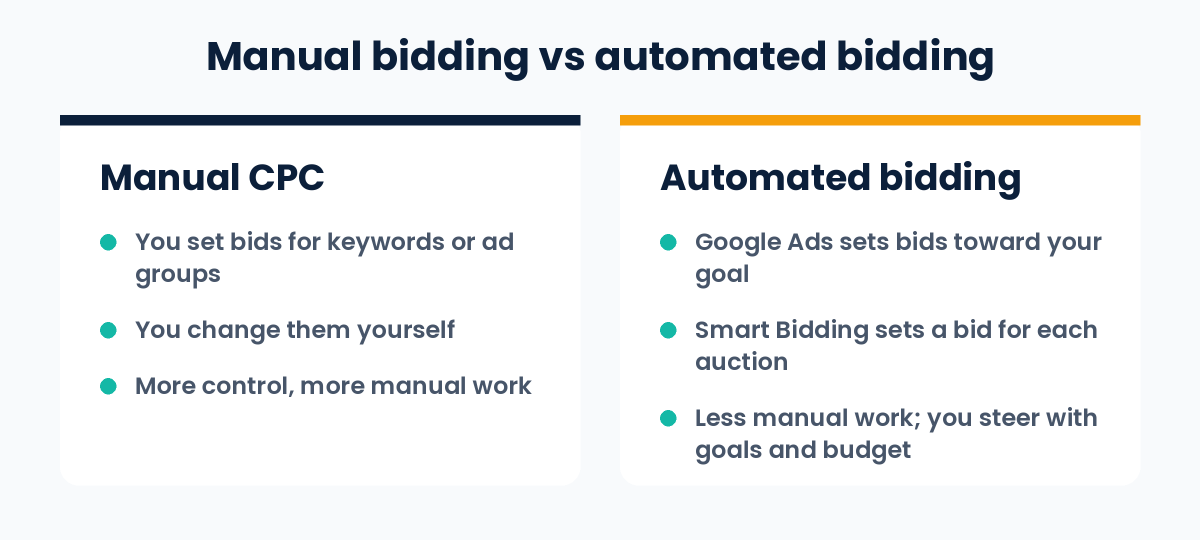
The core benefit of Google Ads automated bidding is that it sets your bids for you. Instead of changing bids by hand for each keyword or ad group, Google Ads sets a bid for each auction, aiming at the goal you choose, such as more conversions or a better return on ad spend. This removes manual work and guesswork from bidding.
In this guide, you will learn what automated bidding is, how it differs from Smart Bidding, which strategy fits which goal, what you need before using it, and where it can fall short. Everything is checked against Google’s own Google Ads Help pages, and the section on recent changes shows what is new in 2025 and 2026.
What Is Automated Bidding in Google Ads?
A bid is the amount you are willing to pay in a Google Ads auction. With manual bidding, you decide the bids yourself. With automated bidding, Google Ads decides them for you.
Google explains that it sets each bid based on how likely the ad is to lead to a click or a conversion that helps you reach your goal. Automated bid strategies also learn as they go: they use how earlier bids performed to improve later ones.
The Core Benefit of Google Ads Automated Bidding, Explained
The core benefit is simple: you tell Google Ads what you want, and it handles the bidding. You do not need to update bids for every keyword or ad group yourself.
This matters because the right bid changes from one search to the next. Who is searching, on which device, from which place and at what time all affect how likely a click is to turn into a sale or a lead. A person cannot adjust bids for each of those situations. Automated bidding can.
Google gives this example: for a restaurant, a search at 8 PM on a Thursday may be more likely to lead to a weekend booking than a search at 8 AM on a Monday. The bid can reflect that difference.
What Else Does It Give You?
Google lists four key benefits for Smart Bidding, the conversion-focused type of automated bidding. They can help you save time and improve performance:
- Advanced machine learning. The algorithms learn from data on a very large scale. They consider more factors than a single person or team could work through by hand.
- A wide range of contextual signals. Signals are facts about the person and their situation at the time of the auction, such as device, location, time of day, browser, operating system and language.
- Flexible performance controls. You set the targets and settings that match your goals. For example, you can optimise to your chosen attribution model, and you can set device-specific targets with Target CPA.
- Transparent reporting. Bid strategy reports, bid strategy statuses, experiments, simulators and alerts help you see what is happening and spot problems.
Google also says Smart Bidding can use search-query-level conversion data across your account. This helps it bid more accurately on keywords that do not have much data of their own.
Automated Bidding vs Smart Bidding
These two terms are often mixed up. Here is how Google separates them:
- Automated bidding is the wider group. It includes every strategy where Google Ads sets bids toward a goal.
- Smart Bidding is the part of it that uses Google AI to optimise for conversions or conversion value in every auction. Google calls this “auction-time bidding”.
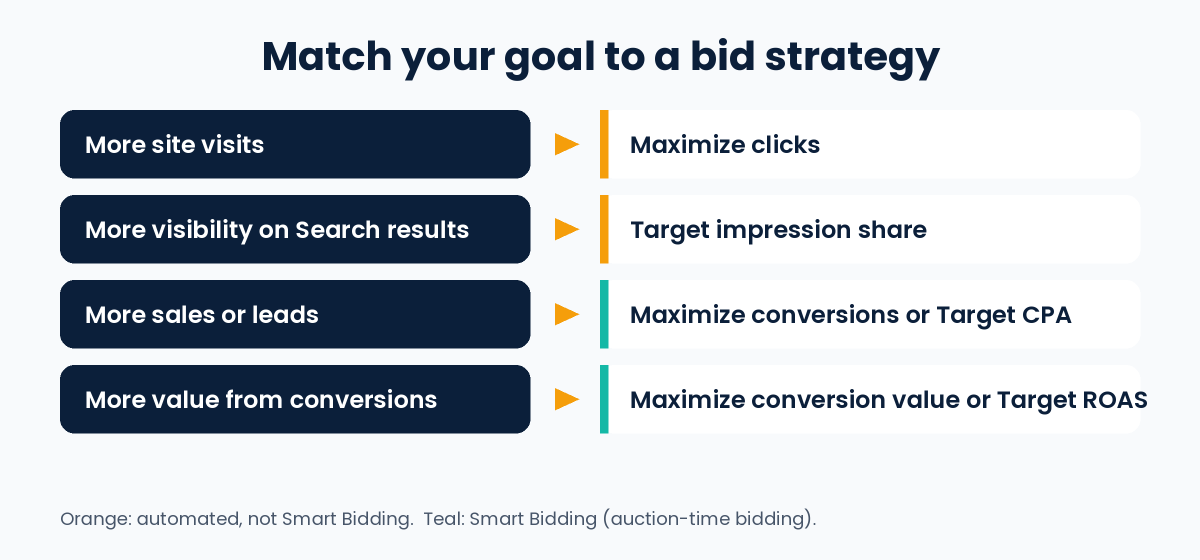
Target CPA, Target ROAS, Maximize conversions and Maximize conversion value are Smart Bidding strategies. Maximize clicks and Target impression share are also automated, but Google says they do not include auction-time bidding.
The Main Automated Bid Strategies
| Strategy | What it aims for | Smart Bidding? |
|---|---|---|
| Maximize clicks | As many clicks as possible within your budget | No |
| Target impression share | Showing your ad at the absolute top, the top or anywhere on the Search results page (Search Network only) | No |
| Maximize conversions | As many conversions as possible within your budget | Yes |
| Target CPA | As many conversions as possible at the cost per action you set | Yes |
| Maximize conversion value | As much conversion value as possible within your budget | Yes |
| Target ROAS | As much conversion value as possible at the return on ad spend you set | Yes |
Some campaign types have extra options. For example, Target CPC is available only for Demand Gen campaigns. Google also notes that these targets are goals, not promises: some conversions may cost more or less than your target.
New to CPA and ROAS? Our guide on what is performance marketing explains both with a simple example.
How to Choose a Strategy for Your Goal
Google’s guidance matches goals to strategies like this:
- More site visits: Maximize clicks
- More visibility on Search results: Target impression share
- More sales or leads: Maximize conversions or Target CPA
- More value or profit from conversions: Maximize conversion value or Target ROAS
If your conversions are worth different amounts, for example products with different prices, a value-based strategy fits better. For that, you need conversion values set up in your account.
What You Need Before You Start
- Conversion tracking. Google says you need conversion tracking enabled to use Smart Bidding. The system learns from the conversions you record.
- Enough data to judge results. You can turn on Smart Bidding without earlier data. For a fair evaluation, Google recommends looking at a longer period with at least 30 conversions, such as a month or more (50 conversions for Target ROAS).
- A realistic target and budget. A target that is too tight or a budget that is too small can limit results.
- Policy compliance. Google says you are responsible for making sure your use of Smart Bidding follows its advertising policies and applicable laws.
Google also says Smart Bidding can use data from all your campaigns, so even a new campaign without its own data may see better performance.
Limits and Things to Watch
Automated bidding is useful, but it is not a magic switch.
- Results depend on your conversion data. The system optimises for the conversions you record. If tracking is wrong or counts the wrong actions, it will optimise for the wrong thing.
- You steer, you do not drive. You control goals, targets and budget, not each individual bid.
- Targets are not guarantees. Google says actual results can be higher or lower than the target you set.
- It needs time. Google advises monitoring performance closely when you change strategy, because bidding adjusts gradually.
- Budget changes can move your costs. Without a target, Maximize conversions and Maximize conversion value aim to spend your full budget, so your actual CPA or ROAS can change when you change the budget.
What Has Changed Recently
Google keeps updating how bidding works. These changes are documented in Google Ads Help:
- Enhanced CPC is gone. From the week of 31 March 2025, Enhanced CPC is no longer available for Search and Display campaigns. Campaigns that were not moved to another strategy now effectively use Manual CPC.
- Strategy labels are changing from June 2026. “Maximize conversions with a Target CPA” is being relabelled “Target CPA”, and “Maximize conversion value with a Target ROAS” is being relabelled “Target ROAS”. During the transition, the names you see may differ slightly. Google says the bidding behaviour stays exactly the same and you do not need to take any action.
- Target-based bidding changed on 17 August 2026. Campaigns that are limited by budget and use Target CPA or Target ROAS now aim more consistently at the target you set, including when you change budgets. If a campaign was beating its target before, it may now deliver closer to the target. Google’s example uses US dollars with a 2-to-1 gap between target and actual cost. In rupees, the same idea is a target CPA of ₹100 with a recent actual CPA of ₹50: the campaign now delivers closer to ₹100. Google will not change your targets or budgets for you, so review them.
How to Set Up Automated Bidding
- Set up conversion tracking for the actions that matter to you, such as purchases or enquiry forms.
- Pick one clear goal: clicks, visibility, conversions or conversion value.
- Choose the matching strategy from the table above.
- Set your target and budget. If you use a target, base it on your real costs and margins.
- Apply it. You can choose a strategy when you create a campaign or change it in the campaign settings. In your account, go to Tools, then Budgets and bidding, then Bid strategies to create or manage strategies. A portfolio bid strategy can cover several campaigns.
- Monitor, then judge. Use the bid strategy reports and give the system time. Judge results over a longer period, not after a few days.
- Test if you are unsure. For Search and Display campaigns, campaign experiments let you compare Smart Bidding with your current method.
One tip from Google: broad match keywords pair well with Smart Bidding strategies, because the system sets a separate bid for each query. Test this against your own results before relying on it.
Common Mistakes to Avoid
- Switching on automated bidding without working conversion tracking
- Judging results after only a few days or a handful of conversions
- Setting a target CPA or ROAS that is far from what your business can really achieve
- Changing the strategy, target and budget all at the same time, so you cannot tell what caused a change
- Counting low-value actions as conversions, so the system chases the wrong results
- Never reviewing targets and budgets after Google changes how a strategy works
Frequently Asked Questions
What is the core benefit of Google Ads automated bidding?
It sets bids for you to meet your performance goals, so you do not have to update bids by hand for each keyword or ad group. With Smart Bidding, it also sets a bid for every auction using many signals, which Google says can save time and improve performance.
Is automated bidding the same as Smart Bidding?
No. Automated bidding is the wider group. Smart Bidding is the part that optimises for conversions or conversion value using auction-time bidding. Maximize clicks and Target impression share are automated but are not Smart Bidding.
Does automated bidding guarantee better results?
No. Google says it can help save time and improve performance, but results depend on your conversion data, targets, budget and the competition. Targets are goals, not guarantees.
How many conversions do I need for Smart Bidding?
You can start without earlier data. For a fair evaluation, Google recommends at least 30 conversions over a month or longer, and 50 for Target ROAS. Check the help page for each strategy, because recommendations vary by campaign type.
Do I need conversion tracking?
Yes, for Smart Bidding. Without it, the system has nothing to learn from.
Can I still control my bids?
You control the goal, the target and the budget, but not individual bids. If you want to set each bid yourself, you need Manual CPC bidding.
Which strategy should I use to get leads?
Google suggests Maximize conversions or Target CPA when your goal is more sales or leads.
I am preparing for a Google Ads exam. Which answer should I choose?
Exam options can be worded differently. Look for the answer that matches the idea above: automated bidding sets bids for you toward your goal, which saves manual work. Always read all the options carefully.
Conclusion
The core benefit of Google Ads automated bidding is that it handles the bidding for you, aiming at the goal you choose. Smart Bidding goes further by setting a bid for each auction using live signals. To get value from it, set up accurate conversion tracking, pick a strategy that matches your goal, give it enough time and data, and review your targets and budgets regularly.
If you would like help running your campaigns, see our Google Ads services.
Sources and further reading (Google Ads Help):
