

Last updated: November 4, 2026
SEO (search engine optimization) is the work of helping search engines understand your pages, and helping people decide to visit them. Done well, it brings visitors who are already looking for what you offer, without you paying for each click.
This guide explains SEO in plain English, gives you a 30-minute check you can run on your own website today, and lists the popular SEO ideas that Google itself says you can stop worrying about. It follows Google’s own SEO Starter Guide, and where I add my own judgement, I say so.
What Is SEO, in Plain Words?
Think of a search engine as a very fast librarian. Your website is a book. SEO makes sure the librarian can find the book, understand what it is about, and recommend it to the right reader.
Google is clear about one thing: there are no secrets that automatically put your site first. SEO is a set of sensible improvements that make it easier for search engines to crawl, index and understand your content. Following them improves your chances, but Google does not promise that any page will be indexed or ranked.
How Search Works, and What You Control
Google Search works in three stages. You have some control at each one.
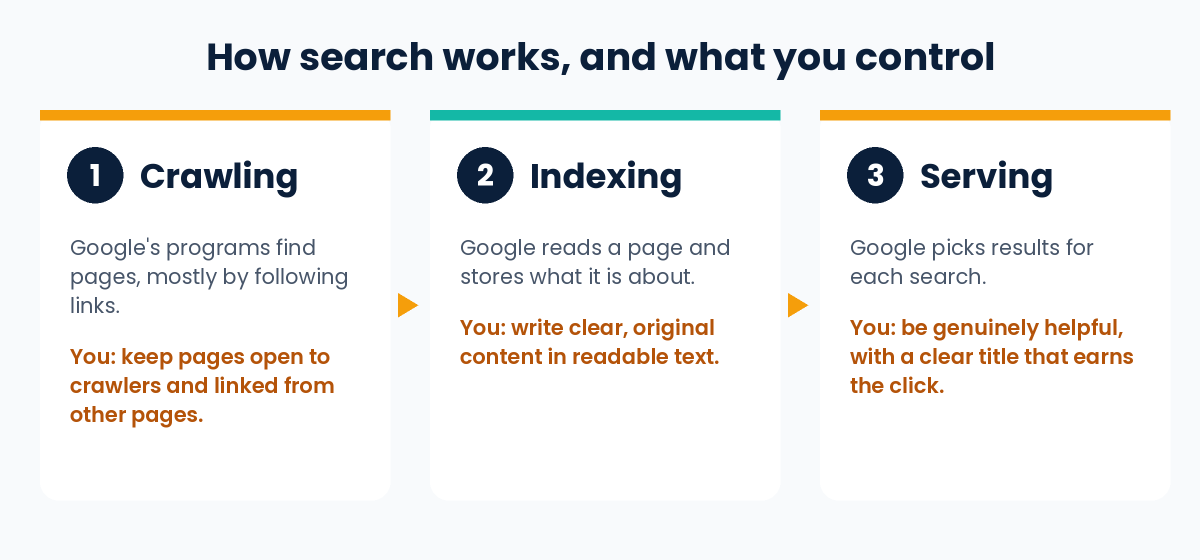
- Crawling. Google’s programs, called crawlers, explore the web and look for pages. They find most pages by following links from pages they already know. You usually do not need to do anything except publish, but you can make crawling easier by linking your pages together and not blocking them by accident.
- Indexing. Google reads the page and stores what it is about. A page can be crawled and still not be indexed, so being found is not guaranteed.
- Serving. When someone searches, Google picks the results it thinks are most helpful for that person. Your title, your content and the usefulness of your page all matter here.
The Three Jobs of SEO
Here is a simple way to remember what SEO asks of you. It is my own framing of Google’s advice, not an official model.
Job 1: Be found
- Make sure search engines are allowed to crawl your pages.
- Link your pages to each other, so every important page can be reached by clicking.
- Optionally, submit a sitemap, which is a file listing the pages you care about. Google says it is not required.
Job 2: Be chosen
- Write a clear title. Google says a good title is unique to the page, clear, concise and accurate about the content.
- Know that the snippet comes from your page. The short description under a result is usually taken from the page content, and sometimes from the meta description. A good meta description is short and specific to that page.
- Use descriptive URLs and image alt text. Words in the URL can appear as breadcrumbs in results, and alt text tells search engines what an image shows.
Job 3: Be useful
This is the job that matters most. Google says that creating content people find helpful and compelling will likely influence your presence in search more than any other suggestion in its guide. Google’s checklist for this is easy to remember:
- Easy to read: well organised, with headings and short paragraphs, and free of spelling and grammar mistakes.
- Unique: created from what you know, not a rehash of what others have already published.
- Up to date: reviewed and refreshed when facts change.
- Helpful and reliable: written for people first, with trustworthy sources.
A 30-Minute SEO Check for Your Own Website
You do not need paid tools for this. Pick one important page and work through the list.
- Check you are in Google. Search Google for
site:yourdomain.com. If results appear, your site is in the index. If nothing appears, check for anything blocking Google before changing anything else. - Look at the page the way Google sees it. In Google Search Console (free), use the URL Inspection tool on your page. It shows whether Google can access and index it.
- Read your title. Is it unique to this page, and does it describe what the page offers? Avoid titles like “Home” or the same title on many pages.
- Read the first screen. Does the page answer the visitor’s question quickly? If a stranger lands here, would they know in five seconds that they are in the right place?
- Check your images. Are they clear, placed near the text they relate to, and described with plain alt text?
- Click through your links. Can you reach every important page from your homepage in a few clicks? Is the link text descriptive, rather than “click here”?
- Look at the page on a phone. Is the text readable, and are ads or pop-ups getting in the way? Google advises against distracting ads and intrusive interstitials.
- Write down three fixes and make them. Then wait a few weeks before judging the effect.
SEO Myths Google Says You Can Ignore
Google’s SEO Starter Guide has a section on things it does not want you to focus on. These are some of the most common ones:
| Popular idea | What Google says |
|---|---|
| Add lots of keywords in the meta keywords tag | Google Search does not use the keywords meta tag. |
| Repeat your keyword as often as possible | Keyword stuffing is tiring for readers and is against Google’s spam policies. |
| There is an ideal word count | There is no magic minimum or maximum word count. |
| Put keywords in your domain name | Keywords in the domain or URL path have hardly any ranking effect beyond appearing in breadcrumbs. |
| Duplicate content gets you penalised | It is inefficient, but it does not cause a manual action. Copying other people’s content is a different matter. |
| Headings must follow a perfect order | Good heading order helps screen readers, but Google Search does not need it in order. |
| E-E-A-T is a ranking factor | Google says it is not. It is a way of thinking about helpful, trustworthy content. |
| Links are everything | Links matter, but PageRank is only one of many signals. |
How Long Does SEO Take?
Google’s honest answer is that it varies. Some changes can show up in a few hours, and others can take several months. Google suggests waiting a few weeks before judging whether a change helped, and notes that not every change will have a visible effect.
You will often see exact timelines such as “3 to 6 months” from agencies and tool companies. Treat those as rough rules of thumb, not promises. Competition, your site’s age and the quality of your content all change the answer.
SEO vs Paid Ads vs GEO
- SEO aims to earn visibility in normal search results. You do not pay Google for a better organic position.
- Paid search ads are a separate system where you pay for visibility. Our guide on what is performance marketing explains how to measure paid results, and our article on the core benefit of Google Ads automated bidding explains how Google sets bids for you.
- GEO (generative engine optimization) is about being cited in AI-written answers. Google says that, from its side, this is still SEO. Read our simple guide to GEO.
Should You Hire an SEO?
You can do the basics yourself. Google’s own starter guide is written for site owners. If you are short on time, a professional can help, but be careful: Google says there are no secrets that guarantee first position, so be wary of anyone who promises it. Ask what they will change on your site, how they will measure it, and what the plan is if results are slow.
Frequently Asked Questions
What does SEO stand for?
SEO stands for search engine optimization. It means improving your website so search engines can understand it and people can find it.
Is SEO free?
You do not pay search engines for organic results, but SEO still costs time, and sometimes money for writers, developers or tools. Many basics, such as clear titles and helpful content, cost nothing except effort.
Is SEO only for Google?
No. Google’s guide says the same best practices make it easier for search engines in general, not just Google, to crawl, index and understand your content.
Can I do SEO myself?
Yes. The 30-minute check above is a good start, and Google’s SEO Starter Guide is free and written for site owners.
How many keywords should I use on a page?
There is no magic number. Write naturally for your reader. Google warns against repeating the same words again and again.
Is E-E-A-T a ranking factor?
Google says no. E-E-A-T stands for experience, expertise, authoritativeness and trust. Google uses it as a way to think about helpful, reliable content, but it is not a direct ranking factor.
Conclusion
SEO is not a trick. It is the habit of making your site easy to find, easy to choose and genuinely useful. Start with the 30-minute check, fix the three biggest problems, and give the changes time to work. If you would like help, see our SEO services.
Sources and further reading (Google Search Central):

4 thoughts on “What Is SEO? A Plain-English Guide for Beginners”