
Last updated: November 5, 2026
Use Target CPA when every conversion is worth about the same to you, for example leads. Use Target ROAS when conversions are worth different amounts, for example shopping orders of different sizes, and you have conversion values set up. Both are Google Ads Smart Bidding strategies that set a bid for each auction, aiming at the target you choose.
The part most guides on Target CPA vs Target ROAS skip is where the target number comes from. This guide shows how to choose between the two, what Google requires for each, and how to set your target from your own break-even numbers instead of a guess. Everything is checked against Google Ads Help pages, and the section on recent changes covers what is new in 2026.
Target CPA vs Target ROAS at a Glance
| Target CPA | Target ROAS | |
|---|---|---|
| You set | The average cost you want to pay per conversion | The conversion value you want back for each rupee of ad spend |
| Google tries to | Get as many conversions as possible at that average cost | Get as much conversion value as possible at that return |
| Treats conversions as | All equal | Different values |
| Needs | Conversion tracking. No conversion history is required | Conversion values, plus at least 15 conversions in the last 30 days for Search and Shopping campaigns |
| Fits, for example | Lead generation where leads are similar in value | Online shops where order values differ |
| Watch out for | A target that is too low can mean fewer conversions | A target that is too high can limit your traffic |
Both strategies set bids at auction time, using signals such as device, browser, location, time of day and remarketing lists. If you want the bigger picture first, read our guide on the core benefit of Google Ads automated bidding.
What Is Target CPA?
Target CPA (cost per action) is an automated strategy that sets bids to get as many conversions as possible. You give Google Ads the average cost you want to pay for one conversion, and it uses that number, along with the likelihood that each click converts, to set the bid.
Google is clear that results will not match your target exactly. Some conversions cost more and some cost less, and your actual CPA also depends on things outside Google’s control, such as changes to your website or ads and more competition in the auction.
What Is Target ROAS?
Target ROAS (return on ad spend) is an automated strategy that predicts the value of a conversion at each auction and bids higher for searches likely to bring high-value conversions. You set the return you want, and Google tries to get as much conversion value as possible at that return.
A detail that confuses many people: Google Ads shows ROAS as a percentage. A target ROAS of 500% means you want 5 rupees of conversion value for every 1 rupee spent. A ROAS of 2.5 in a spreadsheet is 250% in Google Ads.
Which One Should You Choose?
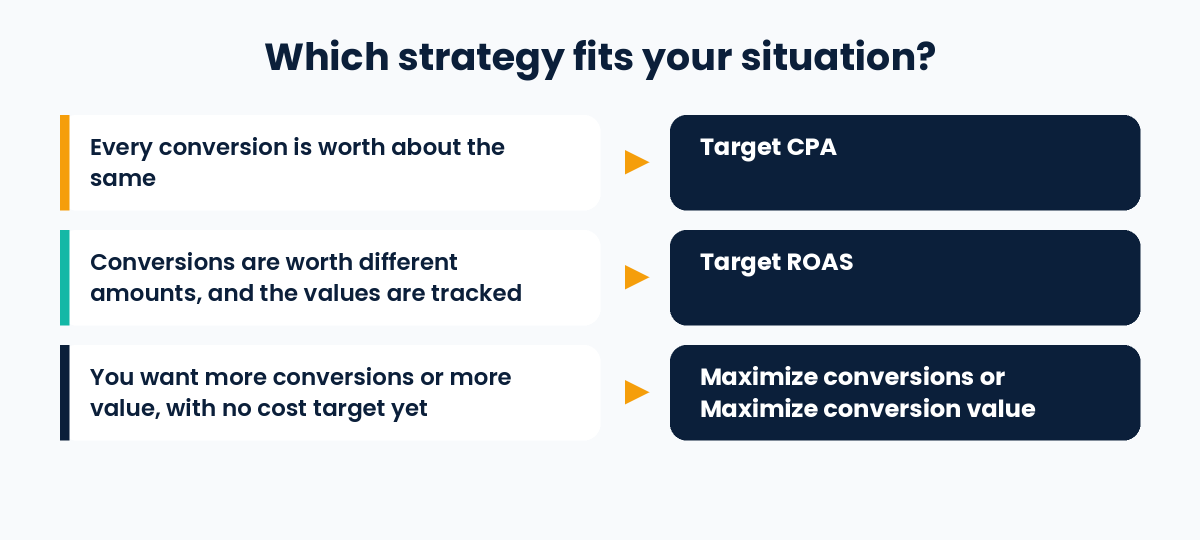
Google’s own guidance gives a simple rule: value-based bidding, which includes Target ROAS, is most helpful when different conversions have different value for your business, or when you have a specific ROAS you are trying to reach. Otherwise, a conversion-based strategy such as Target CPA treats all conversions equally.
Ask yourself four questions:
- Are all my conversions worth about the same? If yes, Target CPA is the natural fit.
- Do my conversions have different values, and can I report those values? If yes, Target ROAS can use that information. If you cannot report values, Target ROAS is not an option yet.
- Do I have enough recent conversions? For Search and Shopping campaigns, Target ROAS needs at least 15 conversions in the last 30 days.
- Do I even have a target yet? If not, Google’s table points to Maximize conversions or Maximize conversion value, which spend your budget for the most conversions or the most value without a cost or return target.
Google also suggests that, ideally, you already bid for the conversion goal you want using Target CPA before moving to Target ROAS. Report values across your relevant campaigns for 4 weeks or 1 to 2 conversion cycles, whichever is longer, before you set a ROAS target.
How to Set Your Target From Your Break-Even Numbers
A target is a business decision, not just a setting. This method is my own suggestion, built on Google’s advice to use your goals and your history. The example is made up.
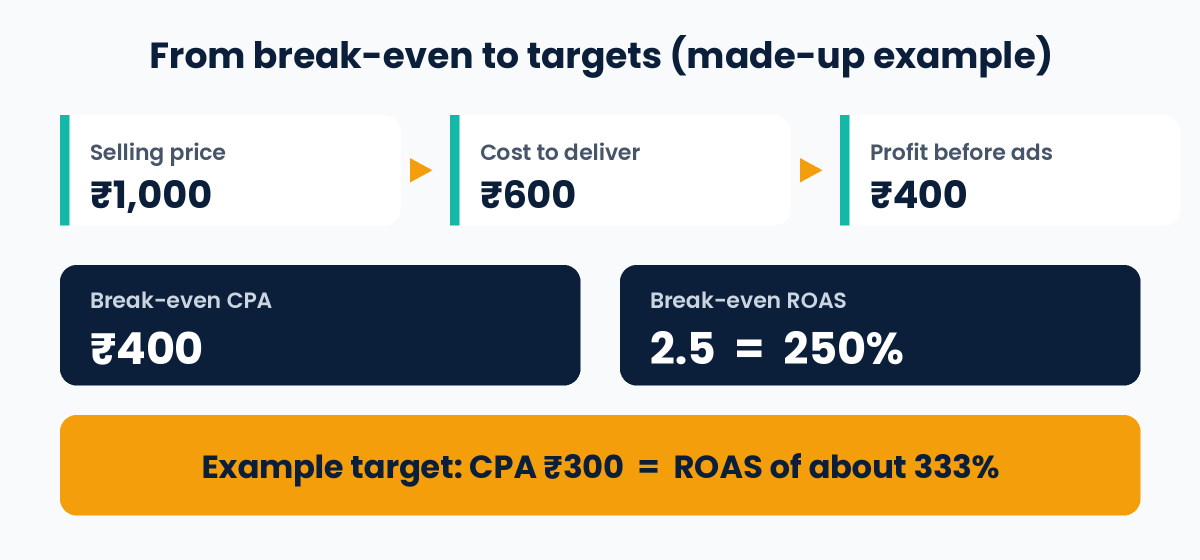
- Work out your break-even numbers. Profit per sale before ads is your selling price minus the cost of delivering it. That profit is your break-even CPA. Break-even ROAS is the selling price divided by that profit. In the example, ₹1,000 minus ₹600 leaves ₹400, so break-even CPA is ₹400 and break-even ROAS is 2.5, which is 250% in Google Ads. Our performance marketing guide has a calculator for this.
- Check your history. For Target CPA, Google recommends using the average CPA from the last 30 days, adjusted for conversion delays. For Target ROAS, add the Conv. value / cost column in Google Ads and multiply it by 100 to get the percentage. Leave out the most recent days, because conversions can take time to arrive.
- Put your target on the profitable side of break-even. A CPA target must be below your break-even CPA, and a ROAS target must be above your break-even ROAS. How far you go depends on how much profit you want per sale.
- Know that the two describe the same thing when sales are equal. If every sale is ₹1,000, a CPA target of ₹300 is the same as a ROAS of about 3.33, or 333%.
- Change targets gradually. Google says that to get more volume with a ROAS target you can lower the target gradually, and to get more value you can raise it. After a change, allow 1 to 2 conversion cycles.
- Compare with the average target, not only your setting. Google Ads reports an “average target CPA” or “average target ROAS”, because the average can differ from the number you set. Google says that is the fairer number to compare your actual results against.
This example ignores repeat purchases and other costs such as staff and tools, so use it as a starting point.
What Google Requires
- Target CPA: conversion tracking set up. Google says you can start without conversion history. For evaluation, it recommends looking at the last 30 days with at least 30 conversions.
- Target ROAS: values set for the conversions you track. For Search and Shopping campaigns, at least 15 conversions in the last 30 days. Other campaign types have different thresholds, such as at least 30 conversions in 30 days for Video action campaigns, so check Google’s page for your campaign type.
- Both: Google recommends being comfortable with spending up to 2 times your average daily budget on a given day. Over a month, you will not be charged more than your average daily budget for 30.4 days.
Settings Google Does Not Recommend
- Bid limits. They can stop Google Ads from adjusting bids to meet your target.
- Separate targets for each ad group. A portfolio strategy, which optimises several campaigns together, can offer better performance if you do not need ad group targets.
- Old bid adjustments. With Target ROAS, existing bid adjustments are not used, except a device adjustment of -100%. With Target CPA, device adjustments change the value of your CPA target, and other adjustments are ignored on the Search and Display Networks.
Common Mistakes to Avoid
- Setting a CPA target far below what your history shows, then wondering why traffic drops
- Setting a ROAS target far above your history, which can limit traffic
- Choosing Target ROAS without reliable conversion values
- Changing the target every few days instead of allowing 1 to 2 conversion cycles
- Judging results over a very short period or with only a handful of conversions
- Comparing actual results to the number you typed, instead of the average target
- Never checking your target against your break-even numbers
What Has Changed in 2026
- Names are changing from June 2026. “Maximize conversions with a Target CPA” is becoming “Target CPA”, and “Maximize conversion value with a Target ROAS” is becoming “Target ROAS”. Google says the bidding behaviour stays exactly the same and you need not take any action.
- Target-based bidding changed on 17 August 2026. For campaigns limited by budget, Google updated its systems to deliver more consistent performance against your target. Google warned this could cause temporary changes in performance and traffic, and it offers a Bid Target Adjustment Tool, available from 6 July 2026, to help you review your settings.
- You can test changes. Instead of saving a new strategy straight away, you can choose Save as experiment to compare it with your original campaign.
Frequently Asked Questions
Which is better, Target CPA or Target ROAS?
Neither is better in general. Target CPA fits when all conversions are worth about the same. Target ROAS fits when conversions have different values and you can report them.
Can I use Target ROAS for lead generation?
Only if you can assign a meaningful value to each lead. Without values, Target ROAS has nothing to optimise, and Target CPA is the simpler choice.
What ROAS target should I set?
Start from your break-even ROAS and your recent history, then choose a target above break-even. Remember that Google Ads shows ROAS as a percentage, so 2.5 becomes 250%.
How many conversions do I need?
For Target CPA, you can start without history, but Google recommends evaluating with at least 30 conversions in 30 days. For Target ROAS on Search and Shopping campaigns, you need at least 15 conversions in the last 30 days and conversion values.
Why is my actual CPA different from my target?
Google says some conversions cost more and some cost less, and your results depend on factors such as your website, your ads and competition. Compare your actual CPA with the average target CPA shown in your reports.
Should I switch from Target CPA to Target ROAS?
Only if your conversions have different values and you can report them reliably. Google suggests running Target CPA on the goal first, reporting values for 4 weeks or 1 to 2 conversion cycles, and testing the change with an experiment.
Is “Maximize conversions with a Target CPA” the same as Target CPA?
Yes. Google says it is a naming change from June 2026 and that the bidding behaviour is the same.
Conclusion
The Target CPA vs Target ROAS choice comes down to one question: are your conversions worth the same? Choose Target CPA when your conversions are alike, and Target ROAS when they are worth different amounts and you can measure that. Then set the target from your break-even numbers and your recent history, change it gradually, and judge results over enough time and conversions.
Related Guides
- Core benefit of Google Ads automated bidding
- What is performance marketing: definition, CPA and ROAS
Sources and further reading (Google Ads Help):

1 thought on “Target CPA vs Target ROAS: How to Choose and Set Targets”